Domo Artificial Intelligence keeps coming up if you’ve spent any time this year researching business intelligence platforms. It’s not a bolt-on chatbot stapled to an old dashboard. Domo AI Cloud is the artificial intelligence layer built directly into Domo, the cloud-based data platform companies use to connect, clean, and act on business data. This guide walks through what Domo Artificial Intelligence is, how it actually works, what it costs, how it stacks up against Power BI and Tableau, and whether it’s worth the investment.
What Is Domo Artificial Intelligence?
A Plain-Language Definition
Domo Artificial Intelligence is the collection of artificial intelligence features built into the Domo Artificial Intelligence Platform. It lets people ask questions about their data in plain English, generate formulas without touching code, build AI agents that carry out business processes, and connect outside AI models to company data, all while keeping that data governed. Domo calls itself an AI and data products platform. Domo AI is what makes that “AI” claim real instead of a line on a slide.
Here’s the short version: Domo Artificial Intelligence removes the technical barrier between a person and their data. A sales manager doesn’t need SQL skills to ask “which region underperformed last quarter and why.” They just ask. Domo Artificial Intelligence finds the right dataset, runs the query, and hands back an answer with a chart.
How Domo Artificial Intelligence Fits Into the Domo Platform
Domo is bigger than a chatbot with a dashboard attached to it. The core platform bundles data integration, ETL (extract, transform, load) tools, visualization, low-code app building, workflow automation, and embedded analytics into one system. The Domo Artificial Intelligence Platform sits inside and on top of all of it. It doesn’t replace what Domo already does. It makes the existing tools faster to use.
Take Magic ETL, Domo’s drag-and-drop tool for cleaning and transforming data. Domo AI Tools like the Text Generation Tile sit right on that canvas, so a user types an instruction instead of building the transformation logic by hand. Beast Mode, Domo’s formula language for custom calculations, gets its own AI assistant that writes a formula from a plain-English description. Same pattern everywhere in the platform: existing feature, plus a natural language shortcut layered on top of it.
Who Domo Artificial Intelligence Is Built For
Three groups, really. Business users want to explore data without learning a query language — this is where Domo Business AI does most of its work, letting non-technical staff query and act on data directly. Data teams want faster ways to prep data and manage models. IT leaders want governance controls that tie AI access to the permissions that already exist. Most BI tools nail one of those groups and leave the other two filing tickets. Domo bets that one platform can serve all three without forcing a trade-off. It’s a similar three-way balancing act to the one companies face when weighing generative AI against agentic AI different teams want different things from the same underlying technology.
How Domo Artificial Intelligence Works
Connecting Your Data Sources
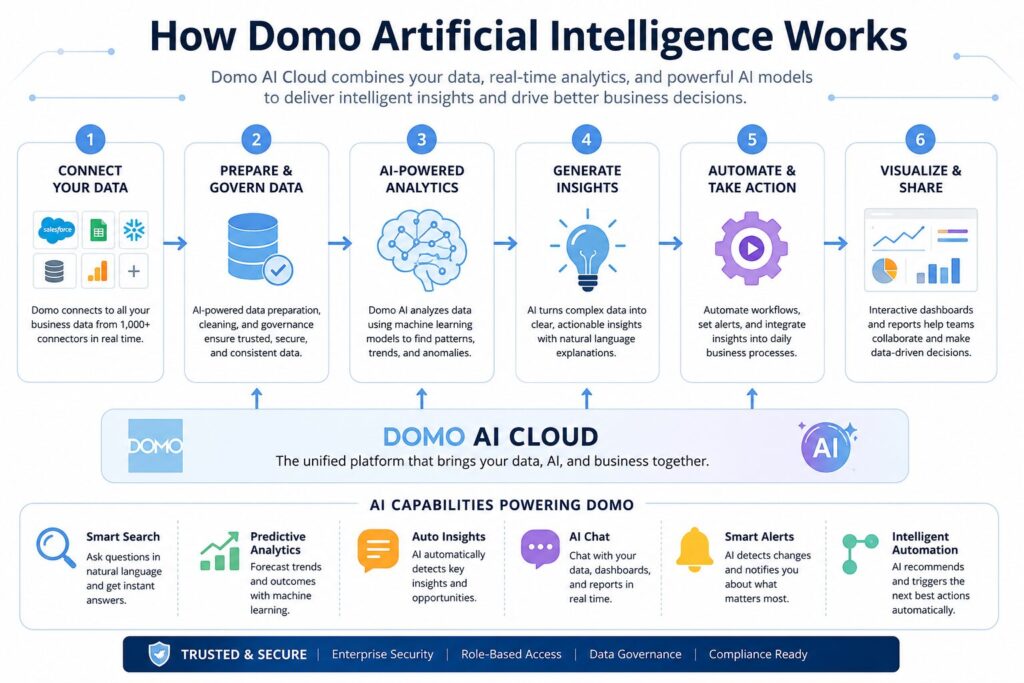
None of this works without data behind it. Domo connects to more than 1,000 pre-built sources, including Salesforce, Snowflake, NetSuite, Google BigQuery, and the usual databases and spreadsheets. It doesn’t copy or relocate your data by default. It surfaces the data inside the platform while leaving the access rules at the source untouched, which keeps AI access tied to the same governance already controlling who sees what.
Turning Questions Into Answers (Natural Language Queries)
Once the data’s connected, the natural language layer does the heavy lifting. Type a question into AI Chat, something like “show me monthly revenue by product category for the last six months,” and the system interprets it, finds the right dataset, builds the query, and returns a chart or table. <cite index=”44-1″>AI Chat in Domo AI is an intelligent operations companion that transforms how you interact with your data, turning complex datasets into clear, actionable insights through natural conversation</cite>.
Text-to-SQL and Text-to-Beast-Mode run on the same idea. Describe the calculation you want in plain language, and Domo Artificial Intelligence writes the underlying logic for you. <cite index=”49-1″>Because Domo AI is built into the platform itself, it understands the specific syntax of Beast Modes, a SQL-like language that differs from standard SQL</cite>. That’s the detail generic AI tools tend to miss, and it’s why the formulas Domo AI generates usually need fewer corrections afterward.
Where the AI Models Come From (OpenAI, Databricks, Bedrock, Hugging Face)
Domo doesn’t build every model in-house. It works more like a hub, plugging into major model providers and letting the customer pick. <cite index=”33-1″>Domo AI supports external models from leading providers, including OpenAI, Hugging Face, Google Gemini, Databricks, and Amazon Bedrock</cite>. If a company already runs models on Databricks or Bedrock, they can wire those straight into Domo AI, <cite index=”39-1″>provisioning inference endpoints right within their Domo instance and connecting them to apps and solutions built inside Domo</cite>. That multi-provider approach is closer to how generative AI tools are converging generally: fewer platforms locking customers into one model family.
What happens to your data depends on which model is doing the work. <cite index=”33-1″>Using DomoGPT means no customer data goes to any external third party. If DomoGPT is turned off, AI Chat and page generation instead route customer data to OpenAI through its API platform, and admins can flip Domo-provided OpenAI models on or off inside the AI Service settings</cite>. Worth checking before rollout, since not every team wants that data leaving Domo’s own environment.
Core Domo Artificial Intelligence Features
AI Chat — Conversational Data Exploration
AI Chat is probably what most people picture when they hear “Domo’s chatbot.” It’s context-aware, referencing whatever datasets and cards are tied to the dashboard or app currently open, so you’re not re-explaining yourself every time. It also shows its work. Users can see the exact steps taken and the underlying SQL behind the answer, and edit that query directly if the auto-generated version is close but not quite right.
That transparency matters more than it sounds. A lot of AI chat tools spit out an answer with zero visibility into how they got there. Domo AI Chat exposing its reasoning gives analysts something to check, not just something to trust blindly.
AI SQL and Beast Mode Formulas
Two tools anchor Domo AI’s “just tell it what you want” approach. AI SQL takes a written description and turns it into a working SQL query, which helps anyone who knows what data they need but doesn’t write SQL every day. Beast Mode AI Assistant does the same job for Domo’s native calculation language. Type “flag rows where order priority is Critical or High as Important” and get back a working formula, no syntax lookup required.
Both run on Domo’s AI Service Layer, and both exist to cut the back-and-forth between business teams and data teams. Instead of filing a ticket for a new calculated field, a marketing manager writes the field herself and only hands off the tricky edge cases.
Custom Model Management and Deployment
For teams running their own machine learning models rather than leaning entirely on third-party AI, Domo AI’s Model Management layer covers that too. Data scientists build, train, and deploy Domo-hosted models through Jupyter Workspaces and AutoML, or register externally hosted models from Databricks, Amazon Bedrock, and OpenAI. Model ownership stays with the data science team, but the output reaches business users through dashboards and workflows without duplicating infrastructure for every single model. Teams weighing whether to build that connective layer themselves often bring in dedicated AI integration services to link models securely into an existing CRM, ERP, or data warehouse.
Agent Catalyst — Building AI Agents Without Code
This is Domo’s more ambitious AI feature: a framework for building autonomous AI agents that don’t just answer a question but execute a task. Domo pitches it as a way to <cite index=”17-1″>develop AI-driven solutions without needing heavy development resources, using low-code, no-code agentic workflows to deploy automation quickly while letting customers scale AI across their business</cite>.
Building one of these agents means defining what data it touches, what tools it’s allowed to call on, and what instructions it follows. <cite index=”19-1″>Domo builds human touchpoints into these agentic workflows so human judgment gets applied at the moments that need review, input, or a final call</cite>, rather than turning an agent loose without oversight. That matters a lot in industries where full automation without a human checkpoint just isn’t an option.
Automated Reporting and Alerts
Domo Artificial Intelligence Analytics also covers the less glamorous side: watching metrics and flagging what changed. Automated Insights is <cite index=”18-1″>AI-powered analysis that identifies key drivers behind business metrics and delivers personalized observations based on a user’s role and data permissions</cite>. Instead of someone eyeballing a dashboard every morning, the system catches the shift and explains what likely caused it. Pair that with Domo’s alert system, which pings users by web, email, or mobile once a metric crosses a threshold, and reporting stops being a scheduled chore and starts looking more like continuous monitoring — a core piece of what makes Domo Intelligent Analytics different from a static BI dashboard.
Domo Artificial Intelligence Pricing and Plans
Domo doesn’t post a public price list. Every deal gets quoted individually after a sales call, and the platform runs on a consumption-based credit model instead of flat per-user pricing. <cite index=”8-1″>Domo moved away from fixed tiered plans — Standard, Enterprise, and Business Critical — to this credit model back in 2023, so older guides that still reference those tiers are out of date</cite>. Here’s a realistic picture of what buyers actually report paying:
| Deployment Size | Typical Annual Cost | What’s Included |
| Small team, entry-level | $30,000–$75,000 | Core dashboards, limited connectors, shared support |
| Mid-market (50–200 users) | $50,000–$250,000 | Volume credit discounts, dedicated account team, Domo AI Services, governance |
| Enterprise (200+ users) | $250,000–$600,000+ | Embedded analytics, premium support, custom terms |
What’s Included at Each Tier
Two platform tiers now cover most of Domo’s business: Standard and Enterprise, with Enterprise unlocking the heavier governance, security, and customization controls. <cite index=”10-1″>Most customers say the Standard tier isn’t enough for real-world deployments and end up upgrading to Enterprise within their first contract term</cite>. Since 2024, per-user licensing has mostly given way to unlimited users on a contract, though total spend still climbs with actual usage.
Consumption-Based Costs to Expect
This is where the pricing model earns its complaints. Credits burn on almost every action: data ingestion, ETL transformations, dashboard refreshes, stored rows, AI queries, all of it. <cite index=”10-1″>Magic ETL charges credits on both the input ingestion and the output transformation, so the same dataset effectively costs twice</cite>. And <cite index=”10-1″>unlike AWS or Azure, Domo doesn’t offer hard credit limits, so overages pile up quietly and show up as a true-up bill at the end of the quarter</cite>. Get a credit-burn estimate before you sign anything, based on your real data volume and refresh cadence, not just headcount. Then revisit it after the first full quarter of use.
Free Trial and How to Access It
There’s a 30-day free trial, but it’s not a self-serve signup flow. You’ll talk to a sales rep first, who’ll ask about user count, data source count, industry, and what BI tools you’re already running. If you’re picturing something as fast as Power BI’s trial, adjust your expectations a bit.
Domo AI vs Other BI Tools
Domo AI vs Power BI
Power BI wins on price, plain and simple, with a per-user fee commonly cited around $10 a month, and it plugs neatly into Excel, Teams, and Azure. <cite index=”27-1″>Power BI works well for Microsoft-centric teams but runs into limitations around embedded analytics, pricing complexity at scale, and performance with large datasets</cite>, which is usually the point where teams start shopping around. Domo’s edge is breadth: data integration, ETL, visualization, app building, and AI agents under one governed roof. The catch is cost. Domo’s consumption pricing sits well above Power BI’s flat per-seat model.
Domo AI vs Tableau
Tableau still wins on pure visualization chops, built on its VizQL engine, with a bigger user community that makes finding trained talent easier. That power comes at the price of a steeper learning curve, though. <cite index=”29-1″>Domo lets users across departments build their own dashboards with drag-and-drop tools, while Tableau’s more advanced analytics usually need a trained analyst or IT support behind them</cite>. On the integration side, <cite index=”29-1″>Domo connects to data sources through pre-built connectors and no-code ETL, while Tableau often needs custom technical setup or outside help for anything complex</cite>. On the AI front, Domo has leaned harder into agent building and natural language querying as core platform features, not add-ons.
When Domo Makes Sense Over a Competitor
Domo tends to win the deal when a company wants one governed platform instead of five separate tools for data prep, dashboards, apps, and AI agents, and when the budget can absorb consumption pricing north of $50,000 a year. It loses the deal for small teams who just need a handful of charts, or for shops already deep in the Microsoft ecosystem, where Power BI’s price advantage is hard to argue with.
Real-World Use Cases
Retail and Customer Insights
Retail and e-commerce teams lean on Domo Artificial Intelligence to bring point-of-sale, inventory, and customer data together, data that’s usually scattered across separate systems. A merchandising manager can ask AI Chat which SKUs are underperforming by region without waiting on an analyst, while Automated Insights catches an unusual sales dip before it ever makes the weekly report.
Finance and Forecasting
Finance teams use Beast Mode and AI SQL to build custom calculated fields, variance analysis, rolling forecasts, and budget-to-actual comparisons, without routing every request through a data team. Custom model deployment lets finance bring its own forecasting models into Domo directly, so predictive numbers sit right next to historical actuals in the same view.
Operations and Cost Reduction
Operations teams put Agent Catalyst to work automating multi-step processes that used to need manual coordination, things like routing exceptions, triggering reorder workflows, or escalating supply chain delays. Because agents run with defined tools and built-in human checkpoints instead of open-ended autonomy, teams can automate the repetitive parts while keeping a person in the loop for anything that actually needs judgment.
How to Get Started With Domo Artificial Intelligence
Preparing Your Data and Team
An AI system is only as good as the data feeding it. Before rolling Domo AI out broadly, audit key datasets for consistency. Duplicate records, missing values, and inconsistent naming conventions all produce confusing answers, even when the AI itself is working correctly. Domo’s AI Readiness tooling, sitting inside the Data Center, exists specifically to catch these problems before they reach end users.
On the people’s side, pick a handful of power users in each department, not IT staff, but the people who already know the data cold, and get them comfortable with AI Chat and Beast Mode AI before opening things up company-wide. Their early questions catch most of the rough edges everyone else would otherwise hit.
A Simple Rollout Plan
A phased rollout beats a single company-wide launch nearly every time, and plenty of teams bring in AI consulting services at this stage to structure the audit and rollout plan before spending real budget. Start with one team and one dataset that everyone already understands. Run AI Chat and Automated Insights against it for a few weeks and clean up data issues as they surface. Once that team is getting reliable answers, move to a second department with different data needs. That step tests whether your governance and permissions setup actually holds up outside the original use case. Only after two or three teams succeed does it make sense to open access company-wide.
Common Mistakes to Avoid
Turning on AI features before governance is sorted out is the big one. Inherited permissions that aren’t set up right mean AI Chat can surface data a user was never supposed to see, which is a far bigger problem than a mislabeled dashboard filter. Second mistake: skipping a usage forecast and getting blindsided by a credit true-up bill nobody budgeted for. Third: treating every AI answer as gospel. Domo AI Chat shows its underlying SQL for a reason. Teams that never look at it lose the chance to catch a wrong assumption before it reaches someone making a real decision.
Is Domo AI Secure?
Data Governance and Compliance
Domo Artificial Intelligence’s security approach comes down to one idea: don’t build a separate, looser rulebook just for AI. <cite index=”33-1″>Domo has been audited and certified for SOC 2 Type 2 and HIPAA compliance, and API inputs and outputs are retained for up to 30 days to identify abuse before being deleted</cite>. <cite index=”33-1″>Customers keep full control over their data and can specify how it’s used inside the platform, with privacy settings built to meet or exceed GDPR and CCPA requirements</cite>.
Which model you use changes what data leaves Domo’s environment. DomoGPT keeps everything internal. OpenAI-backed features send data to OpenAI under an enterprise agreement that <cite index=”33-1″>explicitly does not allow training on customer or business data</cite>. That choice sits with administrators at the account level, not with whichever individual user happens to be logged in.
How Domo Handles Model Access and Permissions
AI features inherit the same permission structure as everything else in Domo. A user’s role determines what AI Chat, Automated Insights, and any agents can see and do on their behalf. Agent Catalyst takes this further, defining exactly which tools and data sources a given agent may touch instead of handing out broad access by default. That level of granularity is what separates a governed AI agent from a generic chatbot with company data bolted on, and it matters most in regulated fields like finance and healthcare, where an agent stepping outside its lane isn’t just annoying, it’s a compliance problem.
Is Domo AI Worth It?
Strengths
Integration depth is Domo AI’s real strength. AI Chat, Beast Mode AI, AI SQL, and Agent Catalyst all live inside the same Domo AI Platform as the data connectors, ETL tools, and dashboards, so there’s no separate AI layer to babysit or reconcile with the rest of the stack. Multi-provider model support, DomoGPT, OpenAI, Databricks, Bedrock, Hugging Face, means no single AI vendor’s roadmap can hold a company hostage. And Agent Catalyst’s governance-first design, with mandatory human checkpoints built in, is a genuinely sound approach for anyone nervous about handing full autonomy to an AI agent in a regulated workflow.
Limitations
Pricing opacity gets the most complaints across independent reviews, and the consumption-credit model makes budgeting a lot harder than a flat per-seat tool like Power BI. The learning curve for advanced features, Magic ETL, Beast Mode, and Agent Catalyst, is real, even with AI lowering the bar somewhat. And Domo’s smaller user community compared to Tableau or Power BI means finding experienced talent or outside support takes longer than it would elsewhere.
Who Should (and Shouldn’t) Use It
Domo AI fits mid-market to enterprise organizations with $50,000 or more to spend annually, data scattered across a lot of sources, and an actual need for both self-service analytics and governed AI agents in the same place. It’s a poor fit for small teams building a handful of dashboards, budget-tight startups, or organizations already deep into the Microsoft ecosystem, where Power BI’s price advantage is hard to walk away from.
Frequently Asked Questions
What’s the difference between Domo and Domo AI? Domo is the full platform: data connectors, ETL, dashboards, apps, and workflow automation. Domo AI is the artificial intelligence layer built into that platform, covering natural language queries, AI-generated formulas, custom model management, and autonomous agents through Agent Catalyst.
Can small businesses use Domo Artificial Intelligence?
Technically, yes, through the 30-day free trial. But the economics rarely work out for small teams. With a realistic entry cost around $30,000 a year and a consumption-based credit model on top, small businesses with modest data needs are usually better off with a lower-cost tool until their data complexity actually grows into Domo’s territory.
Does Domo AI work with existing BI tools?
It’s built to replace a fragmented BI stack rather than sit as an add-on to Power BI or Tableau. That said, it connects to more than 1,000 data sources, including cloud warehouses like Snowflake and BigQuery, so it can run alongside your current tools during a transition instead of forcing an all-at-once switch.
How much technical skill does it take to use?
Basic use, asking AI Chat a question, and viewing a dashboard, takes zero technical background. Advanced features like Magic ETL pipelines, custom Beast Mode logic, and Agent Catalyst workflows have a real learning curve, though the Domo AI Tools built into each one are meant to soften that curve compared to earlier versions of the platform.
Conclusion
Domo Artificial Intelligence combines business intelligence, data management, and artificial intelligence in a single platform, making it easier for organizations to turn data into decisions. From natural language queries and AI-assisted analytics to workflow automation and custom AI agents, it offers a broad set of capabilities for data-driven teams.
That said, Domo Artificial Intelligence isn’t the right fit for every business. Its pricing model and enterprise-focused feature set make it best suited to mid-sized and large organizations with complex data environments. Before investing, assess your data maturity, budget, and long-term analytics goals. If your organization needs a governed platform that brings together data, AI, and automation, Domo AI is a strong option worth evaluating.
Looking for hands-on help evaluating or implementing AI-driven analytics for your business? TrendusAI works with teams choosing and deploying the right AI and data tools for their goals.

Senior SEO Content Marketing Manager at Trendusai.com
Rashida Hanif is a Senior SEO Content Marketing Manager, specializing in data-driven content strategy and SEO. She helps brands improve online visibility through keyword research, content planning, and AI-powered marketing insights.