
You find an AI photo generator free of charge, type a prompt, and get two images before a daily limit shuts you out. Or the one picture you like comes back with a watermark across it. Or the site wants a card number before it lets you download. Free plans change fast, and the pricing pages rarely say where the catch is. We went through ten tools and checked the terms that limit what you can do with the result: daily limit, sign-up, watermark, and commercial use. Every limit below comes from a company page or a recent report. The quick picks come first, so you can stop reading early if one fits.
Best Free AI Photo Generators in 2027 at a Glance
These picks rest on free terms and access. We found no neutral test that ranks these tools on realism, so none of them is a claim about image quality.
| Need | Pick | Why it fits |
| Easiest start | Google Gemini or ChatGPT | You prompt in a normal chat, and both take photo uploads for edits. |
| A clear daily number | Leonardo AI | 150 tokens per day, confirmed on its help center. |
| No sign-up | Craiyon | Works without an account. Free images have a watermark and ads. |
| Text in images | Ideogram | Text rendering is its main feature. |
| Realistic photos | Test two or three | Run the four prompts below and judge the results yourself. |
| No company limit | Flux or Stable Diffusion | Runs on your own computer, so you need a capable graphics card. |
What Is a Free AI Photo Generator and How Does It Work?
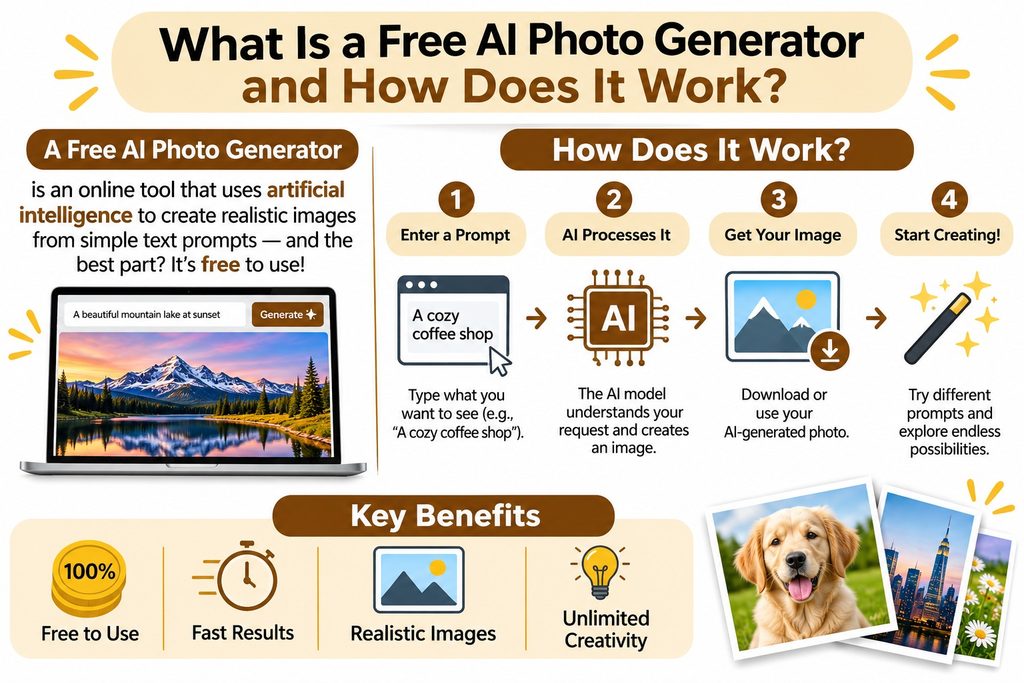
A free AI photo generator turns a text prompt into an image. The method is called text-to-image. A generative AI model learns patterns from huge sets of pictures, and it builds a new image step by step from your words. Search results call it a free AI image generator, an AI picture generator, a free AI art generator, or an image creator. A free text-to-image generator works much like a paid one. What changes is the fine print.
Any free AI photo generator runs in a browser, and many also offer phone apps. A free AI photo generator online is rarely more than a login away.
Text-to-photo vs photo-to-photo (edit your own photo)
Text-to-photo starts from words alone. Photo-to-photo starts from a picture you upload, and the tool restyles it, swaps the background, or extends the scene. If you search for a free AI landscape generator from a photo, this is the type you want, say, a summer hillside shot redone under snow.
Gemini and ChatGPT take uploads in chat. Canva and Fotor build editing tools around the generator, so they double as a photo editor with AI. An AI background generator or a free AI headshot generator works the same way, starting from your own photo.
What “free” really means (credits, daily caps, watermarks)
Almost every tool here is freemium: a free tier with limits, and paid plans without them. The limits take a few forms. Some tools sell credits or tokens, and each image costs a few. Leonardo’s free tokens reset daily and expire unused, while Adobe Firefly’s credits reset monthly and don’t carry over. Others set a plain daily cap, which a company can change without notice.
A watermark is the visible mark on the picture, and some tools add a hidden one too. Leonardo and Ideogram also publish free creations to a public feed. The last piece is commercial rights, meaning the right to use the image for business. Free plans often restrict them.
How We Checked the Free AI Photo Generators
We read each company’s pricing and help pages and compared them with recent reports, all in November 2026. Where sources disagree, the article says so. We did not run an image quality contest.
Same prompts for every tool (portrait, product, landscape, text in image)
Run the same four prompts in every tool and leave them unedited between runs. It takes about ten minutes.
- Portrait: Close-up portrait of a woman in her 30s by a window, soft daylight, natural skin texture.
- Product: A white ceramic mug on a wooden table, morning light, shallow depth of field, product photo.
- Landscape: A mountain lake at sunrise with mist, wide shot, realistic colors, no people.
- Text in image: A poster on a yellow wall that says OPEN DAILY in bold black letters.
Zoom in on hands, eyes, and edges. Check the spelling in prompt four. Save each result at full size so you can compare resolution.
Scoring criteria (realism, speed, limits, watermark, commercial use)
Score each tool from 1 to 5 on realism, speed, free limit, watermark, and commercial use, then weigh them by your job. A blogger needs clear commercial rights. A student may care more about the daily limit.
Free AI Photo Generator Comparison Table (2027)
The figures come from company pages and recent reports as of November 2026. Limits move, so confirm on the tool’s page before you plan work around a number.
| Tool | Free limit | Sign-up | Watermark | Commercial use | Best for |
| Google Gemini | Changing daily cap, no fixed public count | Google account | Visible mark is optional. Hidden SynthID stays. | Read Google’s terms | Chat edits |
| ChatGPT | Own image limit, reports say about 2 to 3 per day | OpenAI account | No visible mark | Read OpenAI’s terms | Detailed prompts |
| Microsoft Designer (Bing Image Creator) | 15 daily boosts | Microsoft account | Hidden mark reported | Read Microsoft’s terms | Quick social images |
| Leonardo AI | 150 tokens per day | Yes | Reports differ | Sources conflict on free plan | Daily experiments |
| Ideogram | About 10 slow credits per week | Yes | None reported | Allowed per Ideogram’s FAQ | Text in images |
| Playground AI | Up to 10 images per 3 hours, reported | Yes | Not confirmed | Reports differ by month | Design plus images |
| Canva AI | Limited monthly uses | Yes | None reported | Read Canva’s terms | Posts and slides |
| Adobe Firefly | Limited credits, monthly | Adobe account | Content Credentials attached | Adobe says outputs are safe for commercial use | Licensing clarity |
| Flux / Stable Diffusion | Your hardware sets it | None | None | Flux schnell: yes, Flux dev: no | Full control |
| Fotor | Limited free credits | Yes | Free exports watermarked | Free output reported personal use only | Editing plus generation |
10 Best Free AI Photo Generators in 2027
These are the best free AI image generators 2027 has so far, listed by how easy each is to start, not by image quality.
1. Google Gemini
Gemini is best for quick image creation and photo edits inside a chat. Free accounts use Nano Banana, Google’s image model, and Google ties the newest version to a paid plan. The free limit is the sticking point. Google says caps change often and reset daily, and it doesn’t publish a fixed count. Reports have cited anywhere from about 20 to 100 images a day, so treat any number as a snapshot.
One upside: since August 2026, a Media watermark setting hides the visible sparkle mark, even on free accounts. Hidden SynthID marks and C2PA data stay in the file.
2. ChatGPT
ChatGPT handles detailed prompts and edits as a conversation. Free users get image creation with its own limit, separate from text chat. OpenAI doesn’t publish a fixed count, and several 2026 reports put it near 2 to 3 images per 24 hours. That small count is the main downside.
It runs on OpenAI’s GPT Image models now, with DALL·E as the earlier engine, and OpenAI’s help center says the current model is open to all tiers. Reports say the images carry no visible watermark. You can see what’s left of your allowance under Settings, in the Usage section.
3. Microsoft Designer (Bing Image Creator)
Designer, Bing Image Creator, and Copilot share the same image tools, and you need a Microsoft account. Microsoft’s page gives free users 15 daily boosts and says boosts don’t equal the number of images. Some support pages say images still generate after boosts run out, only slower. Other reports describe stricter caps since 2025, so trust the counter in the app over any article.
It works well for quick social graphics, and it runs inside Copilot, Bing, and Edge. One report says Microsoft adds an invisible watermark to mark images as AI-generated.
4. Leonardo AI
Leonardo gives free users 150 Fast Tokens a day with no rollover, per its help center. That clear number and a wide choice of models make it a good fit for daily experiments. The costs are on the license side. Free creations are public, and paid plans add private generation.
Commercial use is murky. Some sources say the free plan carries a shared commercial license while Leonardo keeps broad rights over public images. Others say free images aren’t licensed for business. Read the terms before client work. Canva owns Leonardo.
5. Ideogram
Ideogram is the one to try for text in images, like posters and social graphics. Its pricing page, as reviewers report it, gives about 10 slow credits a week, though some guides list higher numbers, so check the page. Free creations are public, the queue is slower, and downloads are JPEG only.
On the plus side, Ideogram’s FAQ says it doesn’t claim ownership of your images and that you can use them for any purpose, commercial use included.
6. Playground AI
Playground pairs image generation with a design editor, which helps with social graphics. Its free plan keeps moving. Mid-2026 reports say up to 10 images per 3 hours, plus a few monthly credits for premium models, and one tracker saw that window cut to 5 in July. It once offered hundreds of images a day.
The free card also went from personal use only to a commercial license between July and August 2026, per one review site. Read the live pricing page before you publish.
7. Canva AI (Magic Media)
Magic Media makes images from a text prompt inside the Canva editor, so results arrive as elements you can edit next to your templates. Canva’s help center says Free users get limited monthly AI use. Outside guides list anywhere from 50 to 200 uses, so check Canva’s usage tracker. The pool is shared across tools, which is the main drawback.
Dream Lab is Canva’s more advanced generator, built on the Leonardo Phoenix model. Reports say Magic Media output has no visible watermark.
8. Adobe Firefly
Firefly suits work where licensing matters. Adobe says its models train on licensed content and public domain material, that outputs are safe for commercial use, and that Content Credentials attach automatically. That statement is general, not tied to one plan, so check the free plan’s terms.
Adobe lists a free plan with limited generations and monthly credits that don’t roll over. Some guides cite 25 credits a month, but Adobe’s page doesn’t print a number we could confirm. Expect a small pool.
9. Flux / Stable Diffusion (free, local)
Flux and Stable Diffusion run on your own computer, so no company sets a daily limit and you need no account. Your hardware sets the ceiling. Local guides say quantized Flux can run on cards with 12 GB of memory, and some setups work on 8 or 6 GB at lower quality. Setup is technical.
Licenses differ. Flux comes from Black Forest Labs. FLUX.1 schnell uses Apache 2.0, which allows commercial use, while FLUX.1 dev is free for personal and research use only. Stable Diffusion models use different licenses by version, some with revenue limits, so read the license page.
10. Fotor (AI generator plus photo editor)
Fotor combines an AI generator with a photo editor and collage tools, so it fits quick edits and generation in one place. Its pricing page lists limited free credits on the Basic plan, with watermarked exports. HD downloads without a watermark need Pro.
Reports disagree on which AI tools the free plan includes, and one 2026 FAQ places image generation in Pro+. Sign up and test before you plan around it.
Free AI Photo Generators With No Sign-Up or Unlimited Use
Is there a free AI image generator with no sign-up? Yes. Craiyon works in the browser without an account, according to several reviews. Free images carry a watermark, and the site shows ads, so a free AI image generator with no sign-up option suits a quick draft more than finished work. The rest of this list is sign-up required: Gemini, ChatGPT, Microsoft, Leonardo, Ideogram, Playground, Canva, Adobe, and Fotor all ask for an account.
Which AI image generator is completely free? Only a local Flux or Stable Diffusion setup has no company limit. Hosted tools sold as an unlimited free AI image generator usually cost you something else: ads, a watermark, speed, or public sharing.
If you want a free AI photo generator with no watermark, ChatGPT adds no visible mark and Gemini lets you switch its mark off. Local Flux leaves it up to you.
NightCafe gives free daily credits, often listed as 5, plus extra for community activity, though pages disagree on its 2026 details. Freepik lists up to 20 AI images a day, with attribution required and personal use only on the free plan, per its docs. Kling is mostly a video tool. Its free Basic plan is not for commercial use and adds a watermark, per Kling’s credit guide.
Best Free AI Photo Generator by Use Case
Realistic photos and headshots
No neutral test ranks free tools on realism, so run the four prompts. For a free AI photo generator realistic result, write specific prompts and compare Gemini, ChatGPT, and Flux side by side. Look at skin, light, and hands first when you judge realistic images, especially photorealistic portraits. A headshot tool needs your own photo, so check the watermark and privacy terms before you upload.
Product photos and social media
Canva AI and Microsoft Designer sit inside design tools many people already use, and Playground AI adds its own editor. Before you post an ad, confirm your plan allows commercial use.
Images with text (logos, posters)
Ideograms are built around text. Reviewers also describe ChatGPT and Flux as handling text well. Proofread every letter before you publish.
Mobile apps
Want an AI photo generator app free to install? Gemini, ChatGPT, Leonardo, Microsoft Designer, Fotor, and NightCafe all have phone apps, and app plans share the web limits.
How to Write Prompts for Realistic AI Photos
Good prompts are plain and specific. A workable formula is subject, setting, light, camera, mood, and what to leave out. Tools differ in prompt fidelity, so short, concrete prompts tend to follow your text prompt more closely.
- Example 1: A baker pulling bread from an oven in a small shop, warm window light, 50mm lens, shallow depth of field, candid documentary style.
- Example 2: A leather backpack on a concrete step, overcast daylight, sharp focus, plain background, product photo.
- Example 3: Foggy pine forest at dawn, wide angle, muted colors, natural light, no people.
Change one thing per prompt so you can see what worked. Download the largest size offered, then view it at full size to judge image quality.
Are Free AI Photo Generators Safe to Use?
Safety here comes down to licenses, privacy, and labels.
Commercial use and licensing
Can I use AI-generated images commercially? It depends on the tool and the plan. Ideogram’s FAQ allows it. Adobe says Firefly outputs are safe for commercial use. Freepik’s free plan is for personal use and needs attribution. Kling’s free content is not for commercial use. FLUX.1 schnell allows it, while FLUX.1 dev does not. On Leonardo and Playground, the free plan terms have been unclear or changed, so read them and save a screenshot.
Copyright is a separate question. The US Copyright Office’s January 2025 report says prompts alone don’t make a user the author of the output, though human edits and creative arrangement can earn protection. A pure AI image may be hard to protect from copying. We aren’t lawyers, so ask one before important work.
Privacy when you upload your own photos
Free tools may store uploads, and some show free creations in public feeds. Read the privacy policy before you upload a face. Skip photos of other people, IDs, and private documents, and delete uploads after use where the tool allows it.
AI disclosure and content credentials
Content Credentials are labels that record where a file came from. Adobe attaches them to Firefly outputs. Google embeds SynthID and C2PA data in Gemini media. Platforms and clients may ask you to label AI-generated images, so check their rules before you post.
Free vs Paid AI Photo Generators: When Should You Upgrade?
Stay on a free plan while you test prompts or make a few images a week. Pay when one of these happens:
- You hit the daily cap before a project is done.
- You need private images, not a public feed.
- You do client work and need clear commercial rights.
- You need a watermark-free export at full resolution.
Leonardo’s paid plans start at $12 a month, Ideogram’s Basic plan costs about $8, and Midjourney’s cheapest plan is $10. Prices change, so check each page.
How to Choose the Right Free AI Photo Generator
- Need commercial rights? Read the free plan terms first.
- Need text within the image? Start with an Ideogram.
- Want no account? Try Craiyon for drafts.
- Want to edit your own photo? Try Gemini, ChatGPT, Canva, or Fotor.
- Have a strong graphics card and some patience? Try Flux locally.
Final Verdict: Which Free AI Photo Generator Is Best in 2027?
No single tool covers every job. Gemini and ChatGPT are the easiest places to start. Leonardo gives a clear daily allowance, Ideogram is the pick for text, and Craiyon needs no account. Flux and Stable Diffusion remove company limits if your computer can run them. For commercial work, read the license first, whichever AI photo generator free plan you choose. Then run the four prompts and keep the tool whose results you like.
Frequently Asked Questions
What is the best free AI photo generator in 2027?
We found no verified winner on image quality. For ease, start with Gemini or ChatGPT. For a published daily allowance, look at Leonardo AI. For text in images, use Ideogram. Test two or three with the same prompts.
Is there a free AI photo generator with no sign-up?
Yes. Craiyon runs without an account, though free images have a watermark and the site shows ads.
Is there an unlimited free AI image generator?
Running Flux or Stable Diffusion on your own computer has no company cap. Hosted tools labeled unlimited usually add ads, watermarks, or slower queues.
Do free AI image generators add watermarks?
Some do. ChatGPT adds no visible mark, and Gemini lets you turn its mark off. Craiyon and Fotor’s free exports carry watermarks, and Freepik requires attribution.
Can I use free AI photos commercially?
It depends on the tool and plan. Ideogram’s FAQ allows it, Adobe says Firefly outputs are safe for commercial use, and Freepik’s free plan is personal use only. Read the terms for your plan.
Which free AI photo generator is most realistic?
No neutral benchmark exists, so we can’t name one. Readers often ask which AI generator is most realistic. Run the four prompts in this guide and compare the results yourself.
Can I turn my own photo into AI art for free?
Yes. Gemini, ChatGPT, Canva, and Fotor accept your photos within their free limits.
Is there a free AI photo generator app for mobile?
Yes. Gemini, ChatGPT, Leonardo, Microsoft Designer, Fotor, and NightCafe have phone apps. Free limits match the web versions.
Is Midjourney free?
No. Midjourney has had no free plan since March 2023, and its cheapest plan is $10 a month. A limited trial exists in its Niji mobile app.
How many free images can I generate per day?
It varies. Leonardo gives 150 tokens a day, Microsoft gives 15 boosts, and ChatGPT reports point to about 2 to 3 images. Gemini and Playground change their caps often.
How to generate AI images for free?
Pick a tool, create an account if it asks, type a specific text prompt, and download the result. Then check the watermark and license before you use it.
Senior Content Manager at TrendusAI
Rashida Hanif is a content strategist at Trendusai.com, creating informative articles on artificial intelligence, emerging technologies, and digital solutions. She focuses on delivering valuable insights that help readers understand AI innovations, software development, and technology trends.