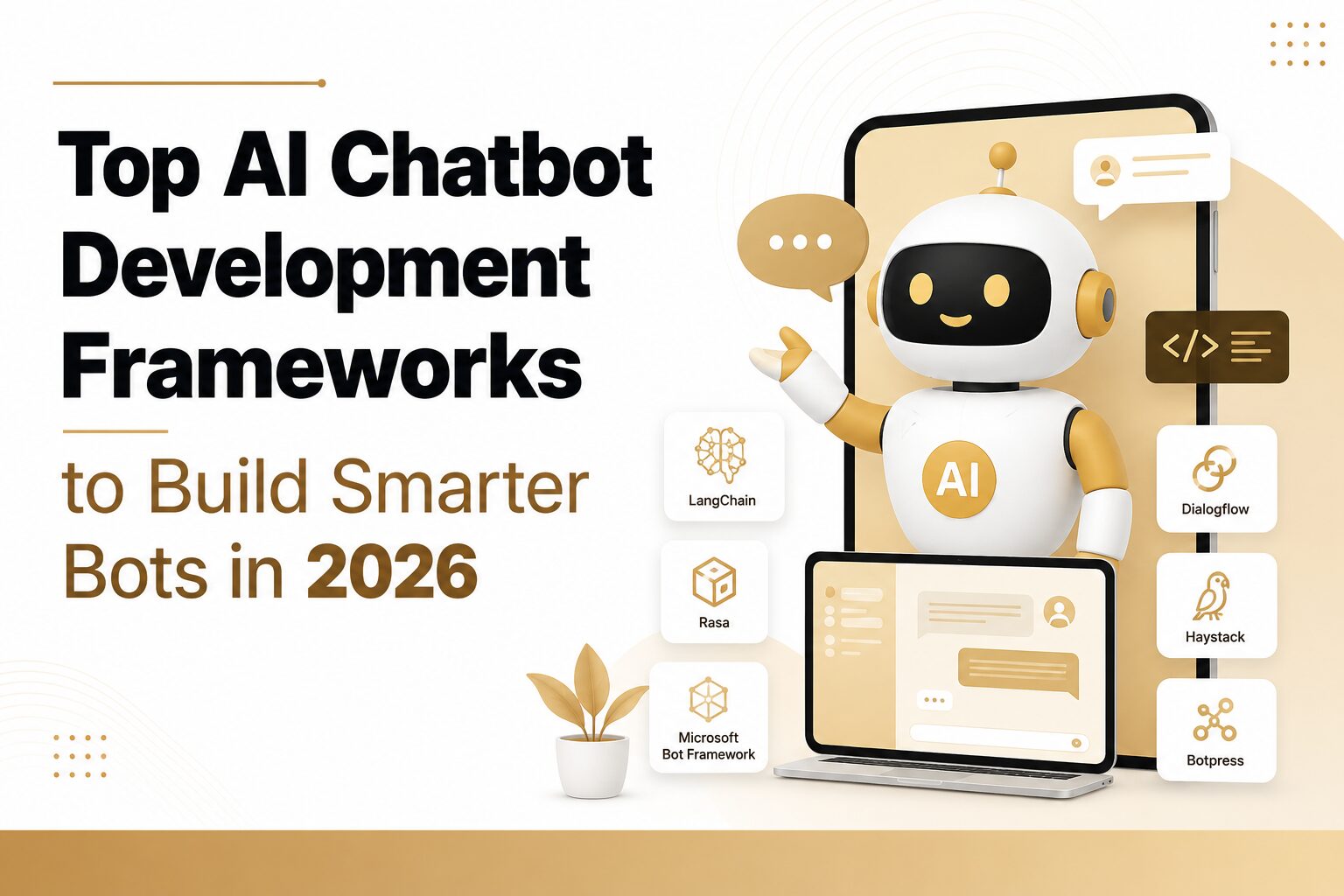
Meta description: Explore the top AI chatbot development frameworks for 2026 to build scalable, smart and high-performing conversational bots.
A year ago, most teams building a chatbot were still stuck choosing between rule-based decision trees and early NLP models, such as Rasa, Dialogflow, and that whole generation. Not anymore. AI chatbot development frameworks have moved hard toward LLM-native architecture. The backbone now is retrieval augmented generation plus tool calling, not some rigid tree of intents a developer mapped out by hand months earlier. A bot today can pull an answer from your knowledge base, check an order status, update a CRM record, all in the same back-and-forth exchange. Try doing that with the old generation of frameworks, and you’d need a mountain of custom code glued on just to fake it.
So why does any of this matter? Because “smarter” used to just mean better intent matching, full stop. Now it means a bot that reasons across a few steps, calls a tool mid-conversation, and grounds its answer in your own data instead of guessing from whatever it absorbed during training. This piece gets into where AI chatbot frameworks actually stand in 2026. What changed, which ones are worth your time, and how do you pick the right one for your team rather than whichever one happens to top someone else’s list this month?
What Is an AI Chatbot Development Framework?
An AI chatbot development framework is the software layer handling natural language understanding, dialogue management, knowledge retrieval, and the integrations a conversational system needs to work, so developers aren’t rebuilding those same pieces on every single project.
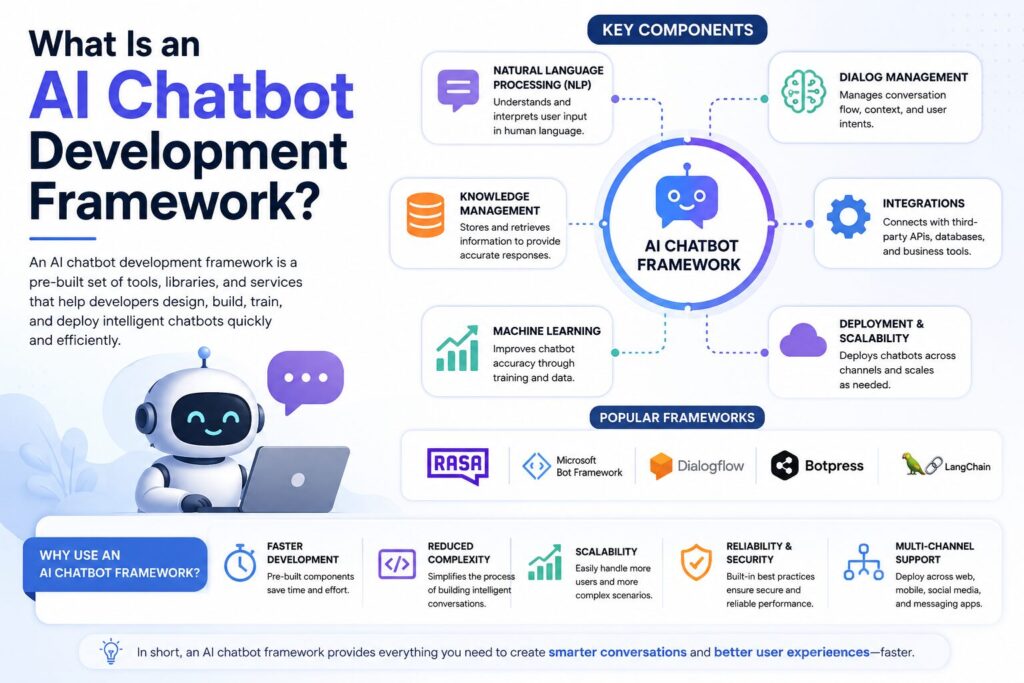
Break it down, and there are really a handful of moving parts. NLU handles intent recognition and entity extraction, figuring out roughly what someone means and pulling the specific details out of it. Dialogue management tracks the conversation flow, where things sit and what should happen next, while holding onto session memory so the bot doesn’t lose context awareness halfway through. Knowledge retrieval, usually RAG plus a vector database, pulls in whatever facts the bot needs, so it isn’t just making something up. Integrations hook the bot into the outside world through function calling, a CRM, maybe, a help desk, sometimes a payment system, and all of that sits on top of a chatbot backend that a developer still has to design carefully, often with a fair bit of prompt engineering involved to get responses right. Deployment tooling gets the finished thing onto whatever channel people actually use, a website widget, WhatsApp, Slack, Microsoft Teams, you name it.
How Chatbot Frameworks Have Changed for 2026
Three fairly distinct generations here, if you zoom out. First came rule-based bots, decision trees, keyword matching, and if-this-then-that logic that fell apart the moment a user phrased something the developer hadn’t guessed at. Then real NLP showed up, Rasa and Dialogflow being the obvious names, using actual machine learning to catch intent and pull entities well enough to hold a normal conversation. The catch? The bot’s knowledge still stopped exactly where someone’s programming did.
Generation three is where things sit now, and it’s LLM-native through and through. LangChain, Botpress’s AI mode, these build straight around large language models like GPT-4.1, GPT-5, Claude, Gemini, and open models such as Llama, Mistral, DeepSeek, and Qwen, so a bot can generate a genuinely new response, pull from live documents through RAG, and reach out to external tools, all without a human coding every path in advance. This is roughly where “chatbot framework” and “AI agent framework” stopped being two separate things, honestly. A support bot and a multi-agent research assistant run on a surprising amount of the same underlying stuff now. Retrieval, tool calling, and orchestration across several steps or several agents at once. LlamaIndex and Haystack handle retrieval particularly well here, usually paired with a vector database like Pinecone, Weaviate, Milvus, ChromaDB, FAISS, or PostgreSQL’s pgvector extension. Semantic Kernel, Dify, Open WebUI, n8n, and the Vercel AI SDK round out the rest of it, everything from lightweight orchestration to self-hosted chat interfaces to workflow automation with a conversation layer bolted on top. Underneath most of this sits fairly standard infrastructure too, Docker and Kubernetes for deployment, Redis for session state, and REST, GraphQL, or WebSocket connections tying it all together, plus growing support for the Model Context Protocol (MCP), which is quickly becoming the standard way agents reach tools and data across different vendors. And behind nearly every framework on this list sits one of a handful of labs, OpenAI, Google, Microsoft, Meta, Amazon Web Services, Anthropic, Cohere, NVIDIA, IBM, Oracle, or Salesforce, each shipping its own models or infrastructure that the framework layer builds on top of.
Top AI Chatbot Development Frameworks in 2026
Rasa (CALM)
Rasa’s CALM setup mixes deterministic business logic with LLM-driven language handling, so it stays predictable while still sounding fairly natural. Runs entirely on-premise if that’s the requirement, and for plenty of teams, that’s the entire reason they’re even looking at it. Best for healthcare, banking, government work, basically anywhere conversation data can’t leave a private environment. What sets it apart: you keep full data ownership without giving up modern, LLM-quality responses. Cost-wise, the core is open-source; Rasa Pro adds enterprise support and governance for a fee.
Dialogflow CX
Dialogflow CX, Google’s version, handles complicated multi-step conversations through a visual state-machine layout, with genuinely strong multilingual NLU and multilingual support baked into native speech-to-text and text-to-speech. Google’s newer Vertex AI Agent Builder sits alongside it, giving teams a more direct path to Gemini models and the rest of Google Cloud’s AI orchestration tooling for agent-style workloads. This one’s for enterprise teams already on Google Cloud, especially anything voice or contact-center related. The edge here is mature NLU across 40-plus languages, tested at real scale. It’s fully managed, usage-based pricing straight through Google Cloud.
Microsoft Bot Framework, Azure AI Bot Service, and Copilot Studio
The Bot Framework SDK gives developers a modular way to build and wire bots across channels. Copilot Studio sits on top as a low-code layer for teams lighter on engineering, all of it running through the Azure AI Bot Service. Fits best for organizations already deep in Microsoft 365, Teams, and the Power Platform. Native integration with SharePoint and Teams is hard to match elsewhere; that’s really the whole pitch. The SDK’s open-source; Copilot Studio and Azure hosting cost money.
Amazon Lex
Same tech behind Alexa, more or less, handling voice and text both, plugging tightly into Amazon Connect for telephony and IVR. Good fit for AWS-native teams doing phone-heavy or voice-first support. Voice recognition here is genuinely mature, years of Alexa work sitting underneath it. Fully managed, pay-as-you-go through AWS.
IBM Watson Assistant
Watson Assistant targets regulated industries needing governance, audit trails, and generative AI that stays grounded in verified content rather than wandering off and hallucinating. Best suited to banking, insurance, and knowledge-heavy regulated environments generally. It ties tightly into Watson Discovery for enterprise document search, which is its real strength. Commercial, enterprise-tiered pricing.
Botpress
Botpress pairs a visual flow builder with actual code extensibility and native RAG support, letting developers bring their own LLM while non-engineers still shape the conversation itself. Best for teams wanting speed without handing over all developer control. It’s a genuinely usable hybrid, visual builder, and code-first work living in the same tool. Free tier available, usage-based once you’re in production.
LangChain
Probably the most widely adopted orchestration library out there for LLM apps, offering composable pieces, chains, tools, memory, retrieval, the works. Best for developers building custom logic that just doesn’t fit a template. Biggest integration ecosystem on this list by a wide margin, nearly every vector database and model provider you’d want. Fully open-source; LangSmith is a paid observability layer on top.
LangGraph
Extends LangChain with stateful, cyclical workflows, built specifically for multi-agent orchestration where specialized agents pass tasks back and forth. Best for agentic systems too tangled for a single linear chain. Graph-based control flow instead of LangChain’s more linear approach, that’s the real difference. Open-source, part of the same family as LangChain.
CrewAI
Takes a role-based approach to multi-agent work. You define agents with roles, goals, and tools, and they collaborate toward one outcome. Best for teams thinking in terms of a “crew” of specialists rather than one generalist bot. Role-based design is just easier to reason about and debug, plain and simple. Open-source, with a managed enterprise version available.
AutoGen
Microsoft Research’s entry here. Multiple agents that talk to each other to solve a task, critiquing and revising each other’s work, which is a bit strange to watch the first time. Best for research-heavy or experimental multi-agent setups. Agents that can actually debate and refine their own output before handing back a final answer. Open-source.
FlowiseAI
A visual, drag-and-drop builder sitting on top of LangChain concepts, so teams put together RAG pipelines and GPT-powered agent workflows without rewriting the same boilerplate every time. Best for low-code teams wanting LangChain’s power without touching raw code. Fully self-hostable through Docker, and finished flows come out as ready REST APIs. Open-source, plus a hosted cloud option if you’d rather not manage it.
OpenAI Assistants and Responses API
Some teams skip a framework entirely and build straight against OpenAI’s Assistants and Responses API, which already bundles retrieval, tool calling, and conversation threading out of the box. Best for teams wanting a direct, LLM-first build without a separate orchestration layer sitting on top. No framework overhead at all, though you trade away some flexibility on model choice. Commercial, usage-based API pricing.
Open-Source vs Enterprise vs No-Code Chatbot Frameworks
| Category | Examples | Data control | Technical skill needed | Typical cost model |
| Open-source frameworks | Rasa, LangChain, LangGraph, LlamaIndex, Haystack | Full, self-hosted | High | Free license, cost shows up later in hosting and engineering hours |
| Enterprise platforms | Dialogflow CX, Amazon Lex, Watson Assistant, Copilot Studio | Vendor-managed, comes with compliance certifications | Low to moderate | Usage-based or seat-based subscription |
| No-code / low-code builders | Botpress, FlowiseAI, Dify | Depends which hosting you pick | Low | Free tier, then usage-based |
The decision between these three, honestly, tends to come down to four questions. How strict is the data privacy requirement, really? How much technical talent is sitting on your team right now, not hypothetically? Which channels do you actually need to be live on? And what happens to the budget once you’re past a pilot and into real volume? A regulated bank pretty much always needs the control an open-source chatbot framework gives it. A five-person support team with no engineers is almost always better off with a no-code builder or a managed enterprise platform, since self-hosting rarely pays for itself at that size, no matter how the sales pitch frames it.
LLM-Native Frameworks vs Traditional NLP Frameworks
Traditional NLP frameworks classify a message into a predefined intent, then trigger a scripted response or a dialogue branch. Fast. Predictable. Also, as brittle as anything, the second someone says something, the developer didn’t see coming.
LLM-native frameworks work differently. RAG pulls relevant chunks of your actual documents into the model’s context before it answers, grounding the response in real information rather than a script written months back, often through the same semantic search and document retrieval techniques that power AI search more broadly. Tool calling, sometimes called function calling depending on the framework, lets the bot do something mid-conversation, check inventory, book an appointment, whatever the task calls for. Multi-agent orchestration, what LangGraph, CrewAI, and AutoGen are all built around, splits one request across several specialized agents, each handling its own slice of a bigger job. Most production deployments also lean on chatbot analytics and sentiment analysis to see whether people are actually getting resolved, and a clean human handoff path for whenever the bot genuinely can’t help.
Which is really why “smarter bots” isn’t just a marketing line here. A bot on a traditional NLP framework is only ever as smart as the intents someone remembered to write. While a bot on an LLM-native framework with decent RAG and tool calling handles stuff nobody planned for, because it’s reasoning against real data and real tools instead of matching a fixed list somebody built once and forgot about.
How to Choose the Right AI Chatbot Framework
Start with Data Privacy
Start with data privacy, before anything else, honestly. Bot touching health records, financial data, or anything with real compliance weight? That alone usually rules out fully managed platforms and points you toward something self-hosted, Rasa or Haystack most likely.
Assess Your Team’s Skill Level
Then be honest, actually honest, about your team’s skill level. A team without ML engineers moves faster with a no-code or low-code builder, Botpress or FlowiseAI, than trying to adopt LangChain and write orchestration logic from scratch, especially for straightforward custom chatbot development on a startup’s timeline.
Review Integration Capabilities
Integration matters just as much. Check whether the chatbot API or SDK connects cleanly to whatever CRM or ticketing system you already run, don’t just assume it will, and confirm it actually supports the omnichannel setup you need, website, WhatsApp, Slack, Microsoft Teams, wherever your customers already are.
Plan for Scalability and Budget
Scalability needs real scrutiny, too, because entry-level pricing rarely reflects what a framework costs once volume climbs into the thousands of conversations a month. Budget should account for the total cost of ownership, not just the license fee, since an open-source framework with no sticker price can still end up costing more in engineering hours than a paid subscription would have anyway.
Choose Based on Your Use Case
By use case, the pattern holds up fairly well across the board. Support automation for a small or mid-size SaaS team tends to fit Botpress, Dify, or FlowiseAI, and the same tools work well for a startup website building its first bot rather than a full intelligent chatbot development program. Internal tools and knowledge assistants, HR, IT help desk, general employee questions, lean toward Haystack or Semantic Kernel, both good at grounded, auditable answers from an internal knowledge base. Voice assistants and IVR work point toward Amazon Lex or Dialogflow CX, given how mature their speech pipelines already are. Multi-step agents, the kind behind AI sales assistants or workflow automation spanning several systems, need LangGraph, CrewAI, or AutoGen underneath to do the actual coordination, and this same layer is really what most conversational AI development and AI assistant development work looks like today, beyond just answering FAQs.
Consider Industry-Specific Requirements
A few industries have their own patterns worth knowing about. Healthcare and banking chatbots gravitate toward Rasa or Watson Assistant for compliance reasons, insurance follows a similar road, eCommerce assistants tend to run well on Botpress or FlowiseAI, and travel, real estate, and education chatbots often land on FlowiseAI or Dialogflow CX for booking flows and FAQ automation.
Combine Frameworks When Needed
Our team at TrendUsAI’s AI chatbot development services usually ends up blending two approaches on a given project, a RAG-focused framework like LlamaIndex handling retrieval, paired with a lighter orchestration layer for the actual conversation, since real deployments rarely fit inside one tool’s feature set cleanly.
FAQs
What is the best AI chatbot framework in 2026?
Not really one single answer here. Rasa and Haystack suit engineering-heavy, compliance-sensitive teams. Botpress and FlowiseAI suit teams wanting speed without owning all their own data infrastructure. LangChain and LangGraph suit developers building custom, agentic systems from the ground up.
Which chatbot framework is easiest for beginners?
FlowiseAI and Botpress, by a good margin, thanks to visual drag-and-drop builders that skip the need for deep machine learning knowledge just to get something live.
Is LangChain better than LlamaIndex?
Different tools solving different problems, really. LangChain orchestrates agents, tools, and conversation logic. LlamaIndex is about ingesting and retrieving data accurately. Plenty of production setups just use both together anyway.
What is the difference between Rasa and Botpress?
Rasa is fully open-source and code-first, built for on-premise hosting and tight control over your NLP models. Botpress is a hybrid, visual builder plus code extensibility, quicker to launch generally,y but with less granular model control.
Which chatbot framework supports GPT models?
Most of the modern ones, LangChain, Botpress, FlowiseAI, Haystack, right alongside Claude, Gemini, various open models too. Nearly every current framework is built to be model-agnostic instead of tied to one provider.
What is the best framework for enterprise AI chatbots?
For regulated enterprises, IBM Watson Assistant and Rasa Pro lead on governance. Microsoft-heavy enterprises usually do better with Copilot Studio and the Bot Framework instead.
How do chatbot frameworks use RAG?
Documents get converted into embeddings, stored in a vector database, and the most relevant chunks get pulled at query time, grounding the model’s answer in real content instead of whatever it absorbed during general training.
Which chatbot framework is open source?
Rasa, LangChain, LangGraph, LlamaIndex, Haystack, and FlowiseAI, all open source, with paid tiers if you want managed hosting or enterprise support layered on.
Which chatbot framework scales best?
Frameworks with model-agnostic architecture and container-based deployment, such as Haystack, LangChain, and Rasa, among them, tend to scale the most predictably, mostly because they dodge vendor lock-in on pricing as usage grows.
How much does chatbot development cost?
A simple FAQ bot on a no-code platform can run as little as $0 to $500 a month. A custom enterprise chatbot on an open-source framework, engineering time included, usually lands somewhere between $15,000 and well over $100,000, depending on integration depth and compliance needs.
Conclusion
The move from NLP-powered chatbot frameworks to LLM-native ones isn’t some minor version bump, not really. It changes what a bot can actually do without a developer guessing every question in advance. Rasa and Haystack still make sense wherever data control isn’t negotiable. Botpress and FlowiseAI get a team to live fast without a heavy engineering lift. LangChain, LangGraph, CrewAI, and AutoGen give developers the orchestration to build something genuinely complex, multi-step agents rather than one scripted bot answering the same five questions on repeat.
Whichever direction fits, the evaluation stays roughly the same: data privacy needs, the technical skill actually sitting on your team, integration requirements, and real cost once you’re at scale, checked before anyone commits budget to it. If you’d rather hand that evaluation and the build to someone else, our AI chatbot development and AI integration services at TrendUsAI cover framework selection, RAG pipeline design, and deployment across whatever channels your customers use. For more on the technology underneath all of this, our guides to generative artificial intelligence and knowledge base software are worth reading next.

Senior SEO Content Marketing Manager at Trendusai.com
Rashida Hanif is a Senior SEO Content Marketing Manager, specializing in data-driven content strategy and SEO. She helps brands improve online visibility through keyword research, content planning, and AI-powered marketing insights.