

You join a call and start talking, only to hear, “You’re on mute.” Then a dog starts barking. People keep typing during the meeting, and when it ends, nobody knows who’s responsible for what. It’s a small mess that happens every day and makes smart people look careless.
This guide covers 20 virtual meeting etiquette rules, grouped by what you do before, during, and after a call. It includes tips for Zoom, Teams, and Google Meet. A quick checklist at the end takes two minutes to review.
What Is Virtual Meeting Etiquette, and Why Should You Care?
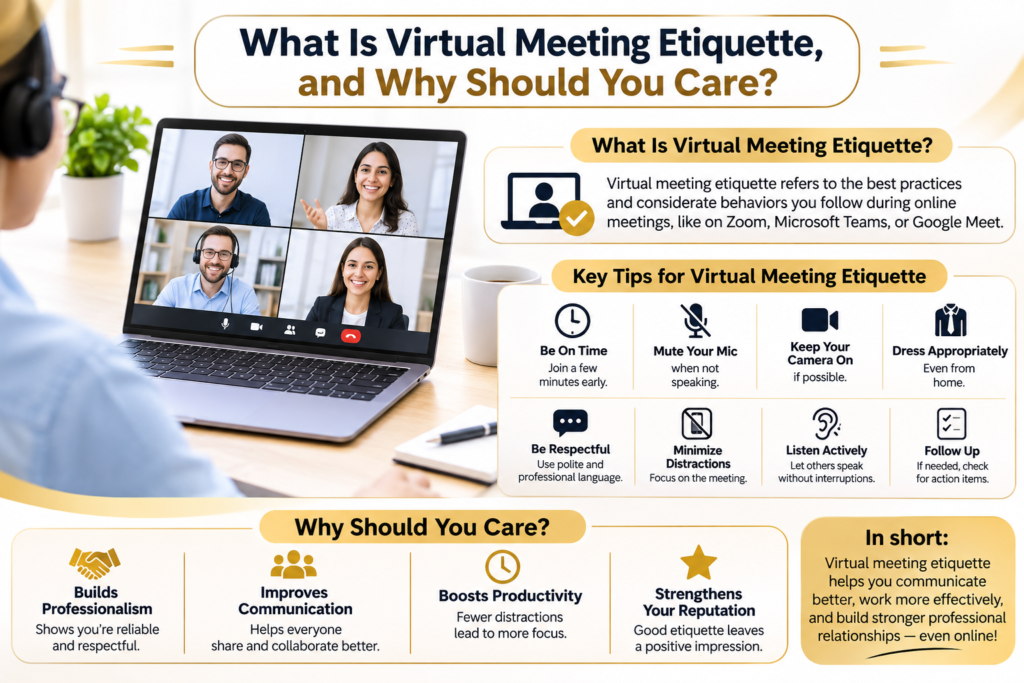
It’s the set of habits that keeps an online call polite, clear, and worth everyone’s time. It’s how you set up your space, how you act while someone else is talking, and what you do once the call is over. Call it online meeting etiquette, video conference etiquette, or remote meeting etiquette; it’s the same idea: the manners you’d use in a conference room, adjusted for a screen.
It matters because remote calls have replaced the hallway. For many teams, the video call is the only place colleagues actually see each other, so the impression you make there sticks.
The cost of sloppy habits adds up quickly. A late start, a dead microphone, and one repeated question can burn ten minutes of a thirty-minute call, and that loss is multiplied by every person on it. Trust suffers too. When you type through a meeting, people notice, and most read it as “my inbox matters more than you.” First impressions on video form fast and are annoyingly hard to fix.
Then there’s fatigue. In February 2021, Stanford professor Jeremy Bailenson published a peer-reviewed paper in Technology, Mind, and Behavior naming four causes of Zoom fatigue: too much close-up eye contact, constantly seeing your own face, barely moving, and the extra work of reading nonverbal cues. A later Stanford survey of 10,591 people, released as a preprint, found the most fatigue among those with more video meetings and more back-to-back ones. The fix isn’t complicated. Shorter calls, real breaks, and clear camera rules.
Before the Meeting
If you’ve ever wondered how to behave in a virtual meeting, the answer starts before anyone says hello. These eight steps take about ten minutes in total.
1. Test your tech and keep a backup
Check your mic, camera, speakers, and connection before any call that matters. Most platforms have a built-in test in the settings, and it takes under a minute.
Then plan for it to fail anyway. Keep your phone nearby with the dial-in number saved, and know how to turn it into a hotspot if your wifi dies. A cheap headset beats a laptop microphone almost every time.
2. Fix your lighting, angle, and background
Looking professional on camera comes down to three things. Face your light source, so a window or a lamp sits in front of you and not behind. Raise the camera to eye level (a stack of books under the laptop works fine). And keep what’s behind you plain: a wall, a tidy shelf.
If the room is a disaster, blur it or use a virtual background, though both can glitch around your hands. Better to move the mess.
3. Dress for the audience
A client call and a Tuesday team check-in don’t need the same outfit. A decent rule: wear what you’d wear if the other person walked into your office. You want people thinking about what you’re saying, not what you’re wearing.
4. Read the agenda (or write one)
Hosts, send the goal, the topics, and any files to read at least a day ahead. Attendees, skim it and jot down your questions beforehand. A meeting with no agenda drifts, and everyone feels it by minute eight.
5. Invite only the people who need to be there
Every extra attendee adds noise and cost. Ask yourself who has to decide, who has to give input, and who just needs the outcome. That last group can read the minutes.
6. Join two or three minutes early
Arriving early gives you time to fix a setting or check your sound without holding up a room full of people. Being on time is a quiet way of saying you respect theirs.
7. Close extra apps and kill notifications
Shut the tabs you don’t need and silence your phone and computer. A private message popping up on a shared screen is a moment nobody forgets, and you can’t undo it.
8. Check privacy settings
Hosts should turn on the waiting room and add a passcode to the link. If you plan to record, say so in the invite and again when the call starts. Recording consent rules differ by country and by state, so don’t assume.
During the Meeting
These twelve habits are what colleagues actually notice in real time. If you only fix a few things, fix these.
9. Mute when you’re not talking
Typing, coughing, a kettle in the next room: an open mic carries all of it. Plenty of teams now join muted by default and unmute only to speak.
On Zoom, click the microphone at the bottom left, hit Alt+A on Windows or Shift+Command+A on a Mac, or hold the spacebar to unmute for a moment.
10. Look at the lens
On video, eye contact means looking at the camera, not at the face on your screen. When you watch the screen, the other person sees your eyes drifting down. Glance at the lens on your key points, and look at faces while others speak.
11. Know when the camera should be on
Cameras on make sense for client meetings, interviews, and small team discussions, where reading reactions builds trust. For big all-hands or long calls, cameras off is usually fine.
I’d argue a blanket “cameras on, always” rule is a mistake, and the fatigue research backs that up. If you need to switch yours off, say so in the chat, and hide your self-view so you’re not staring at yourself for an hour. Is it rude to turn your camera off? Only when the host asked for video, and you gave no reason. Whatever your team decides, put it in the invite so nobody has to guess.
12. Be present
People can tell when your eyes follow another screen. Keep one window open, flip your phone face down, and if something urgent comes up, tell the host and step away rather than half-listening.
13. Keep it short, and don’t talk over people
Make your point, give one example, stop. Video lag makes overlap far worse than in a room, so use the raise hand button or type “question” in the chat and wait to be called on. Pause for a beat after someone finishes. It feels slow, but it keeps the conversation readable.
14. Use the chat on purpose
Chat is good for links, quick questions, and notes that shouldn’t interrupt the speaker. It’s a bad place for side jokes, since everyone can read them and many platforms save the chat with the recording. And check who you’re sending to before you hit enter.
15. Share your screen carefully
Close private tabs, email, and chat windows first. Share a single window instead of your whole desktop when you can. Say what you’re about to show, ask “can you see my screen?”, and stop sharing the moment you’re finished.
16. Don’t eat on camera
Chewing carries, and food on screen pulls attention from the conversation. Eat beforehand.
17. Take notes, and ask before using an AI notetaker
Assign one person to take notes so your records don’t depend on a tool. Capture decisions, action items, and open questions.
AI notetakers, like Zoom AI Companion, can produce a transcript and summary, and many show a notice when they start. Ask the group anyway. Explain where the transcript goes and give people a real chance to object. For sensitive topics such as HR or legal matters, don’t record unless the right people have cleared it.
18. Make it easy for everyone to take part
Turn on live captions when they’re available. They help people with hearing loss, people in noisy places, and people listening in a second language. Google’s own guidance says captions make meetings more accessible. Speak a little slower than usual and skip the slang.
Watch time zones too. If your team spans several, rotate the meeting time so the same people aren’t always joining at 10 p.m. Send slides ahead for anyone on a slow connection, and ask quieter people for their input directly. Equal participation rarely happens by accident.
19. Handle interruptions without drama
Kids walk in, pets bark, wifi fails. Mute, apologize once, carry on. Tell the people you live with when your calls are.
If your tech dies, rejoin from your phone or dial in and let the host know in the chat. If you’re the one who’s late, slip in muted with your camera off, type a quick “sorry I’m late,” and resist asking the group to recap. Read the notes afterward.
20. If you’re hosting, actually host
Open on time, welcome new faces, and state the goal and the ground rules (mute by default, camera expectations). Keep an eye on the chat and the raised hands, and use breakout rooms for group work in bigger calls.
Then stay until the end. Leaving attendees alone in a room you started feels strange for everyone. Close with a summary and a thank you.
Hybrid Meeting Etiquette
Hybrid calls, where some people share a room and others dial in, have one big risk: remote people turn into an afterthought. Three habits help.
Make sure remote people are heard. Use a camera and mic setup that actually picks up the whole room, and test it first. Ask people in the room to speak toward the microphone, and invite remote attendees to speak early on each topic.
Skip the side conversations. A whisper in a room is invisible to people online. They hear noise, or nothing. Save side talk for later, and say the important stuff to everyone.
Name a remote advocate for larger meetings. One person watches the chat, spots raised hands, speaks up for people on screen, and tells the room when audio or video drops.
Etiquette for Different Kinds of Meetings
The core rules stay the same, but the details shift with the audience.
Client meetings. Join early and greet the client by name. Send the agenda ahead, keep your camera on, and share only files meant for them. Confirm next steps out loud before you hang up, then send a written follow-up the same day.
Job interviews. Candidates: test the link the day before, find a quiet spot, look at the camera, keep your resume and a notepad close, dress as you would in person, and send a short thank-you afterward. Recruiters: send the link, time zone, and interviewers’ names in advance. Say if the call is recorded and why. Start on time, explain the steps and timeline, and share a phone number in case the link breaks. How you treat candidates shapes how they talk about your company later.
One-on-ones. A shared agenda doc that both people can edit works well. Avoid last-minute rescheduling, listen more than you talk, and end with agreed action items.
Webinars and large calls. Hosts should mute attendees on entry, use the waiting room, explain how Q&A works, and say whether the session is recorded. Attendees should use Q&A or chat and raise a hand instead of unmuting. Share the recording and slides afterward.
International and cross-cultural meetings. Some cultures expect formal greetings and others skip them, so be patient. Avoid idioms, speak slowly, and confirm key points in writing. Check public holidays and working hours across time zones before you schedule.
Platform Tips: Zoom, Teams, and Google Meet
Knowing your tools is half of good etiquette in 2026. Spend ten minutes finding these features before you need them.
Zoom. Use the waiting room, ask people to join muted, and use the Reactions menu for raised hands. You can hide your self view from the video tile menu, and others will still see you. If you use AI Companion, tell attendees first.
Microsoft Teams. Use the raise hand button and meeting chat, and switch on live captions from the meeting controls. Teams shows a notice when recording or transcription starts, but tell people beforehand anyway. Ctrl+Shift+M mutes and unmutes on Windows.
Google Meet. Raise hand and captions are built in, and you can minimize your self view if it distracts you. Google notes that minimizing only changes your own screen. Ctrl+D toggles mute on Windows.
Using Webex? Same habits. Look for raise hand, captions, and breakout rooms in the meeting controls.
After the Meeting
Good etiquette doesn’t end when you click Leave. Four things matter: a spoken recap, named owners, written minutes, and a careful check of any AI summary.
Close with a verbal summary. Use the last two minutes to state decisions, open questions, and next steps, then ask if anyone sees it differently.
Give every action item an owner and a deadline. “The team will look into it” means nobody will. Say it out loud: “Sara sends the draft by Thursday.” Once a name is attached, accountability is visible to everyone.
Send minutes within 24 hours. While memory is fresh, list the date, attendees, decisions, action items with owners and deadlines, and links to files. It also helps the people who missed the call.
Review AI summaries before you send them. They save real time, and they also get things wrong: misheard names, mixed-up speakers, missed tone. Compare the summary to your notes, fix errors, confirm every owner and date. Treat it as a first draft.
The Mistakes That Show Up Again and Again
Most of these trace back to skipped preparation.
- Joining unprepared. You didn’t read the agenda, so you ask about things the group already settled.
- Staying unmuted. Background noise cuts across the speaker.
- Visible multitasking. Everyone sees your eyes move.
- Talking over others. Overlap makes both voices hard to follow.
- Bad camera or lighting. A dark video makes you hard to read.
- Leaving without next steps. People go back to work unsure who owns what.
- Not sharing outcomes. Without minutes, only attendees benefit.
Virtual Meeting Etiquette Checklist: Do’s and Don’ts
| Stage | Do | Don’t |
| Before | Test your tech and keep a backup plan | Wait until the start time to fix audio |
| Before | Read the agenda and join 2-3 minutes early | Arrive unprepared or late |
| Setup | Use good lighting and a clean background | Sit with a bright window behind you |
| Audio | Mute when you’re not speaking | Type or eat near an open mic |
| Video | Look at the camera and keep it on when expected | Leave the camera off without telling the host |
| Focus | Stay present and use chat with purpose | Check email or other tabs mid-call |
| Sharing | Close private tabs and say what you’re sharing | Share your whole desktop by default |
| Consent | Ask before recording or using an AI notetaker | Record without telling anyone |
| After | Send minutes within 24 hours with owners and deadlines | Leave without next steps |
Final Thoughts
Most of this comes down to a few things: test your tech, read the agenda, mute when you’re not talking, look at the camera, stay present, and end with clear next steps. Add consent for recording, and leave room for captions and time zones. That covers nearly everything people actually notice.
Pick three habits to start with this week. Share the checklist with your team, and add one line to your next invite about cameras and recording. You’ll see the difference quickly.
Frequently Asked Questions
What is virtual meeting etiquette?
The habits that keep online calls respectful, clear, and productive, covering preparation, behavior during the call, and follow-up afterward.
Why does it matter?
Good habits save time, build trust, and protect your professional image. They also cut down on meeting fatigue.
Should cameras be on or off?
It depends on the meeting. Keep them on for client calls, interviews, and small discussions where participation is expected. In large or long calls, off is often fine. Check the invite or ask the host.
Is it okay to record a meeting without asking?
No. Ask first. Consent rules differ by country and state, and some require everyone’s agreement. Even where the law is looser, telling people builds trust.
What should I do if I join late?
Enter muted with your camera off, post a short apology in the chat, and listen. Don’t ask the group to repeat what you missed. Check the notes or ask the host after the call.
What is hybrid meeting etiquette?
The rules for calls with people both in a room and online. The goal is equal participation, so remote attendees hear and are heard as well as those in the room.
What should happen after a meeting ends?
The host or note taker sends minutes within 24 hours, listing decisions, action items, owners, and deadlines. Anyone using an AI summary should review it before sharing.

Senior Content Manager at TrendusAI
Rashida Hanif is a content strategist at Trendusai.com, creating informative articles on artificial intelligence, emerging technologies, and digital solutions. She focuses on delivering valuable insights that help readers understand AI innovations, software development, and technology trends.