You need a lecture, a tutorial, or one of your old uploads on urgent basis, and your Wi-Fi keeps cutting out. You search for a YouTube to MP4 converter and end up on a site with pop-ups, fake download buttons, and a 360p cap. Some want your card number first. Others push software you didn’t ask for.
To resolve your issues, we’ve summed up the top six free and paid tools in this blog post. You’ll learn what each one does, what it costs, and where it lets you down.
Why People Convert YouTube Videos to MP4
A YouTube video is not always convenient to use in its original format. Someone may need an MP4 file to add a clip to a presentation, review footage during a train journey, or keep a reference video available when internet access is unreliable. Teachers can use saved videos as classroom material, while editors may need footage for a project. MP4 also works well across phones, laptops, TVs, and many editing apps, making it a practical format when a video needs to be moved or used outside YouTube.
Why MP4 Is the Best Format for YouTube to MP4 Downloads
MP4 plays on Windows, macOS, Android, and iOS without any extra app. Other formats are fussier. MOV mostly belongs to Apple. MKV holds lots of tracks, but plenty of phones and TVs won’t touch it. WebM is common in browsers, though fewer editors handle it well. AVI is old.
Worth knowing: the format doesn’t set the quality. Resolution and bitrate do. A 1080p video makes a bigger file than the same video at 480p, and a higher bitrate pushes the size up even more.
Free, Paid and AI Tools: Where the Confusion Starts
Search results throw three different things under one label. A free online converter runs in your browser. A paid video downloader is an app you install. An AI tool listens to the speech in a video and gives you text.
Most lists skip this part. Only Fireflies.ai here uses AI. The other five are plain downloaders. And Fireflies.ai works differently anyway: you upload a video file, not a YouTube link.
Who This Guide Is For
Four groups: creators and marketers who repurpose video, students saving lectures and tutorials, regular viewers who want offline viewing, and small teams who need transcripts and summaries. Are you in that last group? Skip ahead to the Fireflies.ai section.
How to Convert YouTube to MP4
Two routes. Use a free tool in your browser, or install a paid app. If you want text along with the video, AI tools are a third choice.
Free Online Converters
It’s a website. You paste the link, pick MP4, and download. You can convert YouTube to MP4 online with no install, and plenty of sites don’t ask you to register.
The price is the page itself. Intrusive ads, fake buttons, and pop-ups are everywhere, and they’re the main security risk. Some sites cap the resolution. Some only do one video at a time. If a site says you must add a browser extension or run an installer before it works, close the tab.
Paid Converters
A paid YouTube video downloader is usually a desktop app, and a few come in Android versions. What you’re buying is an ad-free window, batch downloads, and playlist support. Options like YouTube to MP4 4K / 8K tend to live in these apps. Grab the installer from the maker’s own site only. Fake copies of popular apps are out there.
AI-Powered Tools
These don’t compete on file options. They work with what’s said in the video, so you get transcripts, AI summaries, and subtitles. Only need the file? Skip them. Need one quote from a 90-minute talk? A transcript gets you there much faster than scrubbing through the timeline.
Other Names You’ll See
You’ll bump into SnapDownloader, ByClick Downloader, YTMP3, Y2Mate, ClipConverter, KeepVid, Freemake, MiniTool uTube Downloader, HitPaw, VideoHunter, and Any Video Converter. They aren’t on this list. If you try one anyway, run it through the safety checks below first. HandBrake and FFmpeg are different. They convert files you already have and never fetch anything from YouTube.
6 AI-Powered YouTube to MP4 Converter Tools [Free & Paid]
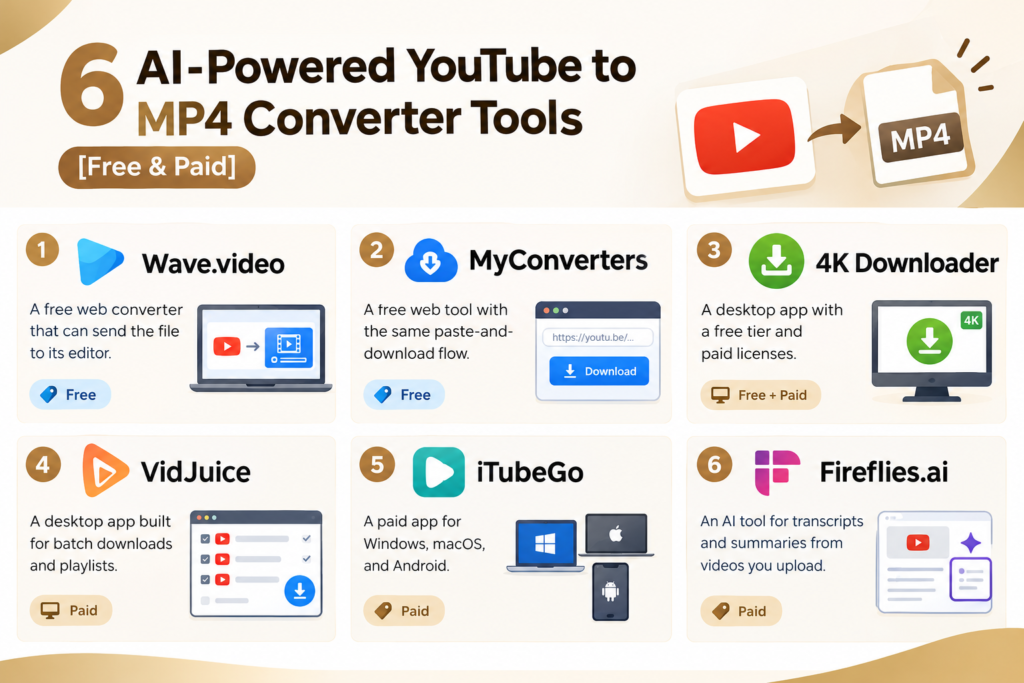
The quick version:
- Wave.video: a free web converter that can send the file to its editor.
- MyConverters: a free web tool with the same paste-and-download flow.
- 4K Downloader: a desktop app with a free tier and paid licenses.
- VidJuice: a desktop app built for batch downloads and playlists.
- iTubeGo: a paid app for Windows, macOS, and Android.
- Fireflies.ai: an AI tool for transcripts and summaries from videos you upload.
Top Free YouTube to MP4 Converter Tools
Wave.video and MyConverters are free online tools. 4K Downloader and VidJuice start free or on trial, then hold you back until you pay. Prices come from the makers’ pages and third-party reviews as of October 2026. Check the live page before you buy.
Wave.video
Overview: It runs in your browser. Paste a link, and it makes an MP4 you can save to your device. You can also push the file to Wave.video’s cloud, its online editor, or its live streaming tools.
Pros: No install. You can edit the file straight after downloading. And it’s a natural fit if you already use Wave.video.
Cons: The converter page doesn’t list a maximum resolution.
Pricing: The converter is free. Paid plans cover the editor and hosting.
Best for: Creators who want to download and edit in one place.
MyConverters
Overview: Much like Wave.video. Copy the video URL, paste it, pick MP4, download.
Pros: The steps are simple, and there’s no software. It works on any device with a browser.
Cons: Free sites differ a lot in ads and limits, so look at the page every time. No maximum resolution is listed either.
Pricing: Free to use. Check the site for any paid options.
Best for: A quick one-off download.
4K Downloader
Overview: A desktop app for Windows, macOS, and Linux. The current product is 4K Video Downloader Plus, because the older 4K Video Downloader lost support on February 1, 2026. It saves videos from YouTube, TikTok, Vimeo, and other sites. Subtitles, playlists, and channel subscriptions are covered too.
Pros: There’s a free tier. Lifetime licenses mean you can skip the yearly bill. Subtitle downloads are supported.
Cons: The free tier stops at 10 videos per day. One reviewer said the app didn’t deliver original 4K or 8K in their test, even though the listed specs say up to 8K.
Pricing: Free (10 videos per day), $15 per year, $25 for a lifetime Personal license, or $45 for a lifetime Pro license.
Best for: Students and viewers who save lectures and playlists on a PC or Mac.
VidJuice
Overview: VidJuice UniTube is a desktop app for Windows and Mac. It supports over 10,000 sites, MP4 and MP3 output, subtitles, and playlists. There’s an in-app browser, so you can browse a site and download without switching windows.
Pros: Batch and bulk downloading. It lists up to 8K. The lifetime plan is cheap.
Cons: There’s no iOS app. Sources disagree on whether a free trial exists. So confirm before you count on one.
Pricing: $9.95 for one month, $19.95 for one year, or $29.95 lifetime for one device. A family lifetime plan costs $39.95 for up to five devices.
Best for: Marketers and teams who download many videos at once.
Top Paid YouTube to MP4 Converter Tools
Paid tools drop the ads and the caps. Your pick depends on one question: do you want files or text?
iTubeGo
Overview: A paid video downloader for Windows, macOS, and Android. It lists 480p to 8K, over 20 video formats, and support for over 10,000 sites. Batch downloads and an in-app browser come with it. That covers YouTube to MP4 at 1080p/HD and higher.
Pros: It works on desktop and Android. Playlists and batches are supported. There’s a lifetime plan.
Cons: Mac prices run higher than Windows, and prices move with promotions.
Pricing: Windows plans have been listed at $9.95 per month, with a lifetime plan at $29.95. Reviews list Mac pricing from $12.95 per month and $49.95 lifetime. Check the official page for today’s price.
Best for: People who want a paid YouTube-to-MP4 downloader on both a PC and an Android phone.
Fireflies.ai (AI-Powered Pick)
Overview: Fireflies.ai started as a meeting assistant, but it also takes uploaded audio and video files. It’s not a link-based converter, so you need a video file already. It turns the speech into a transcript and a summary. Fireflies lists SOC 2 and GDPR compliance, which matters if the video holds client or team data.
How it works:
- Upload the video file to your Fireflies dashboard.
- Wait for the transcript and summary to finish.
- Open the recording and use the download option to save the video, if your plan allows it.
AI features: Transcripts give you searchable text of what was said. Summaries give short notes and action items. Soundbites are short clips cut from key moments. AskFred is a chat assistant you can ask questions about the video.
Pros: You get text, not only a file. It’s good for finding one moment in a long recording. There’s a free plan to test it.
Cons: It can’t pull from a YouTube link. Downloading is limited on the Free plan. AI credits are separate from the plan price.
Pricing: Free at $0. Pro costs $10 per seat per month billed annually, or $18 billed monthly. Business costs $19 per seat per month billed annually, or $29 billed monthly. Enterprise starts at $39 per seat per month. Sources disagree on which plan includes video recording, so confirm on the pricing page.
Best for: Small teams that need transcripts and AI summaries from video.
Use Converters Legally and Safely
Copyright and YouTube’s Terms of Service
Is it legal to convert YouTube to MP4? It depends on the video and how you use it. YouTube’s Terms of Service don’t allow downloads unless YouTube gives you a download button or link, or you have written permission. Copyright law applies as well, and it differs by country. A tool being easy to find doesn’t make the use legal.
A few cases are safer. Your own uploads are fine. Videos marked Creative Commons are fine too, but you still need to credit the creator. For offline playback, YouTube Premium has in-app downloads, though those aren’t MP4 files you can move around. This isn’t legal advice, so talk to a lawyer about commercial use.
Fake Buttons and Pop-Ups
On free sites, ads often dress up as download buttons. The real one is usually plain and sits near the file name. Close any pop-up asking you to update, or install a browser extension. And don’t enter a card on a free tool you haven’t checked.
Checking Permissions
Read the permission list before you install anything. A video downloader doesn’t need your contacts or your messages. Get installers from the maker’s site only, and scan the file with your security software before opening it.
How We Chose These Tools
We looked at published features, pricing pages, and third-party reviews. We didn’t run our own speed tests, so you won’t find speed claims here. We weighed seven things:
- Quality: the highest resolution the maker lists
- Speed: only where the maker states it
- Bulk support: playlists and batch download
- Extra features: subtitles, transcripts, editing
- Platform: web, desktop, or mobile
- Security: ads, installers, and compliance statements
- Pricing: free tiers, subscriptions, and lifetime plans
Quick Comparison
| Tool | Type | Max quality | Platform | Standout feature | Price |
| Wave.video | Free, online | Not listed | Browser | Sends files to its editor | Free converter |
| MyConverters | Free, online | Not listed | Browser | Paste and download | Free |
| 4K Downloader | Free and paid, desktop app | Up to 8K (listed) | Windows, macOS, Linux | Playlists, subscriptions, subtitles | Free (10 per day), $15 per year, $25 or $45 lifetime |
| VidJuice | Paid, desktop app | Up to 8K (listed) | Windows, Mac | Batch download, 10,000+ sites | $9.95 monthly, $19.95 yearly, $29.95 lifetime |
| iTubeGo | Paid, desktop app | Up to 8K (listed) | Windows, macOS, Android | Batch download, in-app browser | From $9.95 monthly, lifetime from $29.95 |
| Fireflies.ai | Paid, AI | Not applicable (you upload the file) | Web | Transcripts, summaries, AskFred | Free, $10 Pro, $19 Business (annual, per seat) |
Step-by-Step: Convert a YouTube to MP4 Video
These five steps work for most tools. Menus look different from app to app, but the order is the same.
- Copy the video URL. Open the video and copy the link from the address bar or the Share button.
- Paste the link. Open your tool and paste it into the box.
- Choose MP4. Pick MP4 as the format and a resolution. Take the highest one the video offers.
- Convert. Click convert or download. One click starts it. Longer videos take more time.
- Save the file. Pick a folder, then open the MP4 and check the sound and picture.
Extra steps for Fireflies.ai:
- Save the MP4 to your computer first, using one of the tools above.
- Upload the file to your Fireflies dashboard.
- Wait for the transcript, then open the summary.
- Use AskFred to ask about one part of the video.
- Cut Soundbites for short clips.
Which Tool Should You Choose?
| Use case | Pick | Reason |
| One quick video, no install | Wave.video or MyConverters | Browser-based, free |
| Lectures and playlists on a PC | 4K Downloader | Playlists and subtitles, free tier |
| Many videos at once | VidJuice | Batch and bulk downloading |
| PC plus Android phone | iTubeGo | Desktop and Android apps |
| Transcripts and AI summaries | Fireflies.ai | Text from video |
| Editing after download | Wave.video | Built-in editor path |
Tips for the Best MP4 Quality and Safety
- Start from the best source. A converter can’t add detail the video never had. A 720p upload won’t turn into 4K.
- Match resolution to the screen. YouTube to MP4 in HD / 1080p / 4K means bigger files, and a phone screen rarely needs 4K.
- Watch file size and bitrate. More bitrate gives a better picture and a larger file. Check your free space before a batch.
- Skip the watermark. Some free tools add one. If you want YouTube to MP4 without a watermark, check the free-tier limits first, or pay for a plan.
- Convert locally when you can. HandBrake and FFmpeg can change a file you already have into AVI, MOV, MKV, or WebM. No upload needed.
- Extract audio when you only need sound. Many tools offer a YouTube to MP3 option, and a separate guide on YouTube to MP3 covers it.
- Keep your system updated. Update your browser and leave your security software on.
FAQs
Is it legal to convert YouTube to MP4?
It depends. YouTube’s Terms of Service block downloads unless YouTube provides the option or you have permission. Your own videos and Creative Commons videos are lower risk. Copyright rules vary by country, so check yours.
Are free converters safe?
Some are. Many aren’t. The usual problems are intrusive ads, fake buttons, and bundled software. Use the safety checks above. An app from the maker’s own site is easier to verify than an unknown web page.
What is the best free YouTube to MP4 converter?
It depends on what you need. Wave.video and MyConverters work in the browser. 4K Downloader has a free tier of 10 videos per day and handles playlists. Pick by use case.
Can I convert a playlist at once?
With some apps, yes. 4K Downloader, VidJuice, and iTubeGo list playlist or batch support. Online tools usually handle one video at a time, so check each page.
Can AI improve video quality?
No. A converter only repackages what’s already there. Fireflies.ai adds text from the video, not a sharper picture. Upscaling software exists, but it’s a different kind of tool.
Can I convert YouTube to MP4 on mobile?
Yes. A YouTube to MP4 converter for PC is often an installed app, but a web tool like Wave.video works in a phone browser. iTubeGo has an Android app. iPhone users have fewer app choices, so web tools are the usual route.
Conclusion
Pick the tool for the job. Wave.video and MyConverters work well for quick, free downloads. 4K Downloader and VidJuice suit playlists and bulk work. iTubeGo is for people who want one paid app on desktop and Android. If you need transcripts and AI summaries, go with Fireflies.ai, as long as you upload the file yourself.
Whatever you choose, stick to your own videos or content you have permission to use, and stay away from fake buttons. Ready to start? Copy the link, try a free option first, and upgrade only if the limits get in your way.

Senior SEO Content Marketing Manager at Trendusai.com
Rashida Hanif is a Senior SEO Content Marketing Manager, specializing in data-driven content strategy and SEO. She helps brands improve online visibility through keyword research, content planning, and AI-powered marketing insights.