You bought a camera, and now the app won’t load. Alerts show up ten minutes late, or they flood your phone every time a tree moves. Some apps ask for a monthly fee after week one. A good camerabewaking app should cover the basics without those headaches. A camerabewaking app (security camera monitoring application) lets you watch live footage, check alerts, and control your home security cameras directly from your smartphone.
Camerabewaking is Dutch for camera surveillance. This guide compares ten apps, explains the features that matter, and covers setup and safety, so you can pick one before you download anything. Prices and features change often, so check each store listing before you pay.
Quick Answer: Which App Fits Your Setup?
Pick by what you already own.
- Spare phone or tablet: Alfred Camera, on iOS and Android.
- Reolink cameras or recorders: the Reolink app.
- IP cameras and an Apple device: Cam Hero.
- Private detection on an iPhone: AiCam.
- Battery camera with built-in storage: Noorio.
- Free core features and a card slot: Wyze or Tapo.
- Cloud clips and object alerts: Arlo, with a paid plan.
What Is a Camerabewaking App and How Does It Work?
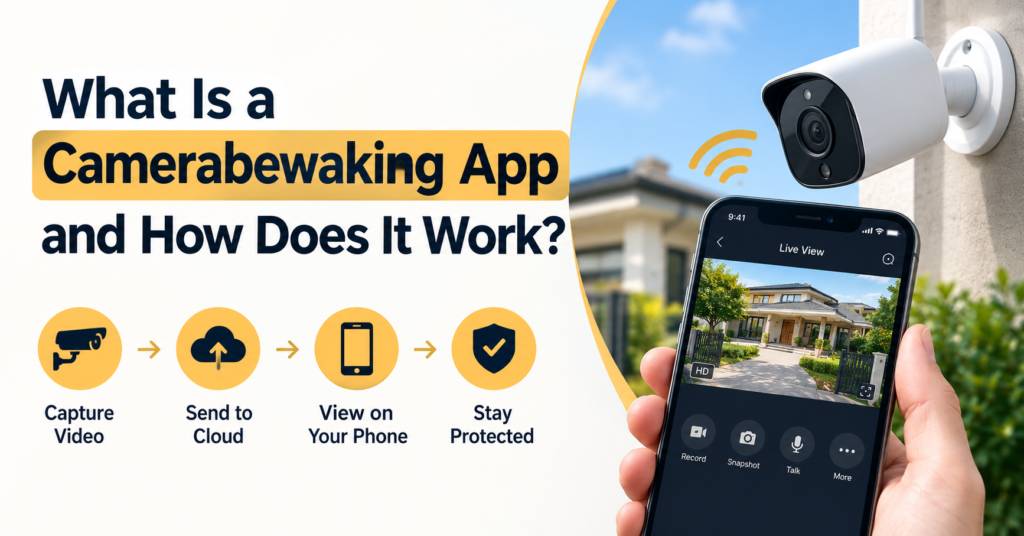
An app like this links your phone to a camera. The camera records video and sends it over Wi-Fi or mobile data. You see the live camera feed on your screen. When something moves, push notifications for cameras land on your phone. That’s remote camera monitoring in plain terms.
Camerabewaking apps fall into three groups. Some turn an old phone into a camera. Others belong to one brand of Wi-Fi security camera, such as Arlo or Noorio. The third group is a CCTV & IP Camera Viewer App, which reads streams from cameras you already own. These viewers often find cameras through two standard protocols, ONVIF and RTSP.
Together, the cameras and the app form a small home surveillance system. Add sensors or a floodlight, and you have the start of smart home security. Home users, beginners, and small shop owners all use these setups, from one nursery camera to several cameras at a store.
Key Features to Look For in a Camerabewaking App
Five features decide how useful an app feels day to day. Check them against your own needs before you compare prices.
Live Streaming Security Camera and Real-Time Video Feed
A live streaming security camera should open a stream within a few seconds and hold it on mobile data. Test both before you trust it. Resolution matters too. The Noorio B310 records in 2K, while AlfredCam tops out at 1080p.
Some brands keep the live view free and charge for recording. Arlo works that way on its modern cameras. Reolink’s app shows up to 16 channels on one screen, which helps if you run several cameras. A real-time video feed is the core job, so don’t let extras distract you from it.
Motion Detection Alerts and Push Notifications for Cameras
Basic motion detection alerts fire on any movement, including shadows and branches. Smarter alerts tell people, pets, and vehicles apart. On Arlo’s free tier, you get a plain motion message. An Arlo Secure plan adds detection for people, vehicles, animals, and packages. Wyze splits things the same way. Motion and sound alerts cost nothing, and smarter detection sits behind the paid Cam Plus plan.
Draw zones around doors and gates. Lower the sensitivity if alerts pile up. Also allow notifications in your phone settings, since battery saver modes can delay them.
Cloud Storage vs Local Storage
Cloud storage vs local storage comes down to cost versus risk. Cloud clips sit on a company server, so they survive if a thief takes the camera. You usually pay every month for that. Local video clip storage on a card or internal memory has no monthly fee, but the footage goes with the camera if it’s stolen.
The Noorio B310 holds 16GB on the camera and offers cloud as an option. Most Wyze Cams have a microSD slot for 24/7 recording. AiCam lets you save video on the device or in your iCloud account.
Two-Way Audio Camera App
A two-way audio camera app lets you talk through the camera’s speaker. It suits deliveries, kids at home, and pets. The camera and the app must both support it. Presence enables two-way conversation with pets and loved ones. Arlo cameras offer two-way audio without a subscription, and Wyze includes it on every Wyze Cam. Rules on recording sound differ by place, so check yours.
PTZ (Pan Tilt Zoom) Control
PTZ (pan tilt zoom) control moves the lens left, right, up, and down, and zooms in. The app only sends the command. The camera needs a motor to follow it. Reolink’s app can steer its PTZ cameras remotely. A fixed camera can only zoom digitally, which crops the picture. PTZ helps in yards, shops, and wide rooms where one lens has to cover a lot of ground.
Top 10 Camerabewaking Apps for Real-Time Monitoring in 2026
| App | Best fit | Platforms | Storage | Cost model |
| Alfred Camera | Old phones used as cameras | iOS, Android, web viewing | Cloud, internal storage | Free, optional Premium |
| Cam Hero | IP cameras from many brands | iPhone, iPad, Mac, Apple TV | Local, iCloud sync | Free, paid extras |
| AiCam | Old iPhone or iPad as a private camera | iPhone, iPad | Device or iCloud | Free, paid extras |
| Presence Video Security | Old phone with basic alerts | iOS listing confirmed | Small free cloud plan | Free, paid Pro tier |
| Noorio | Battery cameras with built-in storage | iOS, Android | Camera, optional cloud | Camera purchase, cloud optional |
| Arlo | Cloud recording and object alerts | iOS, Android | Cloud with a plan, local on some models | Plan needed for most features |
| Backstreet Surveillance | Viewing Backstreet systems | iPhone, iPad, Mac | Recorder or cloud device | Free app, system required |
| Reolink | Reolink IP cameras and NVRs | iOS, Android | microSD card or NVR | Free app, Reolink hardware required |
| Wyze | Wyze cameras with free core features | iOS, Android | microSD, optional cloud | Free core features, optional Cam Plus |
| Tapo | Tapo cameras with card storage | iOS, Android | microSD, optional Tapo Care cloud | Free core features, optional Tapo Care |
Alfred Camera: Free Surveillance Camera App for Old Phones
Alfred Camera turns spare phones into cameras. Its App Store page says more than 90 million families use it, and the app is free with an optional Premium plan. Listed features include motion detection, night mode, web viewing, and clips saved from before the motion began. For people without a spare phone, the maker also sells AlfredCam hardware with night vision and two-way talk.
Cam Hero: CCTV & IP Camera Viewer App for Apple Devices
Cam Hero gathers cameras from many brands in one place. The list includes Reolink, TP-Link, Tapo, Eufy, and Hikvision. It finds ONVIF and RTSP cameras automatically and works on your local network without internet. To watch from outside your home, you use another device as a home hub. AI that runs on the device detects people, vehicles, and pets. The listing covers Apple devices only, so Android owners need another IP camera viewer.
AiCam: Private Motion Detection on Your iPhone
AiCam turns an unused iPhone or iPad into a camera. Detection runs on the device, and the internet is only needed for iCloud saving or push notifications. It recognizes people, familiar and unfamiliar faces, pets, vehicles, and sounds like glass breaking or a baby crying. Alerts can also go out as webhook requests, and Face ID or Touch ID can lock each screen. Don’t confuse it with ASUS AiCam, a separate companion app for ASUS cameras.
Presence Video Security: Simple Old Phone Camera
Presence, from People Power, needs two devices. One is an old phone or tablet that acts as the camera, and the other is your main phone. The listing mentions recorded video alerts, remote switching between front and back cameras, and flash control. The free plan included 50MB of encrypted cloud storage, with a paid Pro tier for more. A store tracker shows the iOS listing was last updated in December 2020, so confirm it runs on your phone before you build a setup around it.
Noorio: Wi-Fi Security Camera With Local Storage
Noorio Innovations makes battery cameras such as the B200, B210, and B310. The B310 is an outdoor 2K camera with a 600 lumen floodlight, person detection, two-way audio, a siren, and IP66 weatherproofing. The Noorio app works on Android and iOS. Setup starts with scanning a QR code on the camera inside the app. Check your Wi-Fi band first, because the B200-SE listing says it needs 2.4GHz.
Arlo: Cloud Recording for Home Security Camera Apps
Arlo cameras work with the Arlo Secure app. Modern models give you live view and plain motion notifications without a plan. Cloud recording, object detection, and cloud activity zones need an Arlo Secure plan. New cameras come with a free trial of the plan. Some models can record locally through a base station. Plan details differ by country, so check Arlo’s pricing page for yours.
Backstreet Surveillance: Viewer and Shop Apps for iPhone
Backstreet Surveillance has two iPhone apps. The Backstreet Surveillance app is a shopping app for browsing equipment. Cyber Secure Plus is the viewer. It lists live viewing, playback, push alarms, and cloud device management. Its privacy label says contact info and identifiers may be linked to you, so read that label before you sign in.
Reolink: App for Reolink IP Cameras and NVRs
Reolink’s app opens Reolink IP cameras and NVRs on your phone. You can view several channels at once, replay footage from a camera’s SD card or an NVR drive, schedule recordings, get motion alerts by push or email, and steer PTZ cameras. The listing notes it works with Reolink devices only. The app is free to download on iOS and Android.
Wyze: Free Core Features With Optional Cam Plus
Every Wyze Cam, the company says, works without a subscription for live streaming, two-way audio, and basic motion alerts. Most models take a microSD card for continuous local recording. Cam Plus is optional and adds smart AI detections and cloud video storage. The pattern is simple: the camera works on day one, and the paid plan adds extras.
Tapo: TP-Link’s App for Tapo Cameras
The Tapo app manages TP-Link’s Tapo cameras. You can use live view, alerts, two-way audio, activity zones, local storage, and motion detection at no cost. Tapo Care, a paid plan, adds cloud clip history and alerts that include snapshots. Some Tapo Care features aren’t released in every region, so read what your app shows.
Names like Emizentech and Gensecurity also turn up in searches for this topic. We couldn’t confirm what apps they offer. Check each company’s own site and the developer name in the store before you install or pay.
Security Camera Apps for Android: What to Check
Alfred Camera has an Android version, and Noorio, Arlo, and Reolink all run on Android. Wyze and Tapo publish Android apps too. Cam Hero, AiCam, and Cyber Secure Plus are listed for Apple devices. For Presence, look on Google Play before you plan around it. Confirm your Android version meets the app’s minimum.
Free Surveillance Camera App Options
Alfred Camera, Cam Hero, AiCam, Presence, and Reolink are free to download. Free here means the app costs nothing to install. Extra features or storage may cost money inside the app. Home security camera apps from camera brands, like Noorio’s, Arlo’s, Wyze’s, and Tapo’s, work with their own cameras. The real cost is the hardware and any plan.
Camerabewaking App: A Beginner’s Guide to Setup
This camerabewaking app blog post doubles as a 2026 deployment guide, so the steps follow the order most people need. Use this camerabewaking app guide as a checklist and tick items off as you go.
Pair Your Camera With the App
- Check that the camera and the app support each other. For IP cameras, look for ONVIF or RTSP.
- Install the app from the App Store or Google Play. Create an account with a password you don’t use anywhere else.
- Update the camera firmware if the app offers it.
- Connect the camera to your Wi-Fi. Many cameras use 2.4GHz only, so confirm your router’s band.
- Scan the QR code or follow the pairing steps in the app.
- Set motion zones and sensitivity.
- Test the live view on mobile data, away from your home Wi-Fi.
If you use a phone as the camera, keep it plugged in, out of direct sun, and somewhere with airflow.
Choose the Right App for Indoor, Outdoor, or Commercial Use
Indoor rooms need little more than a phone camera app or a small Wi-Fi camera. Outdoor spots call for a weather rating, a power plan, and night vision. The Noorio B310, for example, lists IP66 weatherproofing.
Commercial use usually means several cameras, playback by date, and shared access for staff. A viewer built for recorders, like Cyber Secure Plus, or a general IP camera viewer matches that need better than a phone camera app.
Safety Tips for Security Camera Apps
Strong Passwords and Two-Factor Authentication (2FA) Security
Use a unique password for every camera account. A password manager makes that easy. Then turn on two-factor authentication (2FA) security if the app offers it. A Microsoft study of commercial accounts found that multifactor authentication cut the risk of compromise by 99.22 percent, and authenticator apps did better than text message codes. That research covered work accounts, not camera apps, but the reasoning applies to any login.
Regular App and Firmware Updates
Updates carry security patches. Turn on automatic app updates and check the camera’s firmware screen once a month. Look at the last update date in the store listing before you install anything. An app that hasn’t changed in years is a warning sign.
Avoid Public Wi-Fi and Use a Secure Network
Skip café and airport Wi-Fi when you open your camera feed. Use mobile data or your home network with a strong Wi-Fi password. Change the router’s default admin password too. Read the app’s privacy label, since it shows what data the developer says it collects. Keep cameras out of private spaces, and tell guests and staff where cameras are.
DIY vs Professional Setup
A DIY setup fits one or two cameras. A spare phone with Alfred Camera or AiCam works, and so does a battery camera like a Noorio. You control the cost and can move things around freely.
A professional installer makes sense for wired cameras, many channels, or a recorder. Budget and compatibility drive the choice. Ask which app the system uses, whether it runs on iOS and Android, and where footage is stored. Ask for admin login details in your name.
Camerabewaking App Download, Login, and APK Questions
Camerabewaking App Download for iOS and Android
Each camera brand ships its own app, so search for the app name, not the word camerabewaking. A camerabewaking app for iOS lives in the App Store, and the Android version in Google Play. Check that the developer name matches the camera maker.
Camerabewaking App Login Problems
Most login trouble comes from a wrong email, an expired 2FA code, or an old app version. Reset the password, check that your phone’s clock is correct, and update the app. If the camera shows offline, restart it and the router. Contact the app maker if the account stays locked.
Camerabewaking App APK Files
An APK is an Android install file. Google Play is the safest source. If you must use one, get it from the maker’s own site. Files from random sites can carry malware. Skip any APK that asks for permissions a camera app doesn’t need, like your contacts.
Final Recommendation by Use Case
Choosing the right camerabewaking app depends on your setup: indoor, outdoor, or commercial.
- Home: With a spare phone, Alfred Camera or AiCam are simple places to start.
- Budget: Free apps cover live view, and a used phone costs nothing.
- Outdoor: A camera with local storage, such as the Noorio B310, avoids a storage plan.
- Cloud alerts: Arlo fits if you accept a plan.
- Small business: A viewer like Cam Hero on Apple devices, or the app that comes with your recorder, handles many feeds.
The best camerabewaking app works with your camera, your phone, and your budget, and comes from a developer you can identify. Open the App Store or Google Play, check the developer name and last update date, then install one and test it for a week.
FAQs
What is a camerabewaking app?
It’s software on your phone that shows live video from security cameras, sends alerts, and lets you change camera settings. Camerabewaking is Dutch for camera surveillance.
Which camerabewaking app is best for Android?
The right pick follows your hardware. Use Alfred Camera for a spare phone, the Noorio app for Noorio cameras, Arlo’s app for Arlo cameras, and the Reolink app for Reolink cameras.
Is there a free surveillance camera app?
Yes. Alfred Camera, Cam Hero, AiCam, Presence, and Reolink are free to download, with paid extras or hardware needs. Check the storage and feature limits first.
Can I use an old phone as a security camera?
Yes. Alfred Camera, AiCam, Presence, and Cam Hero all support it. Keep the phone plugged in and connected to Wi-Fi.
What are the best home security camera apps?
No single app wins for everyone. Match the app to your cameras, your phone, and how you want to store footage. Then compare the store listings above.

Senior SEO Content Marketing Manager at Trendusai.com
Rashida Hanif is a Senior SEO Content Marketing Manager, specializing in data-driven content strategy and SEO. She helps brands improve online visibility through keyword research, content planning, and AI-powered marketing insights.