
Most enterprises patch their operating systems on schedule. Windows updates go out. Servers get rebooted. The security team checks the box. And yet, breaches still happen, not through exotic zero-day exploits, but through a forgotten PDF reader, an outdated browser plugin, or a legacy media tool sitting on hundreds of endpoints that nobody thought to update. That is exactly the gap a Corporate Software Inspector is designed to close. This guide covers what it does, how it works, who benefits from it, and what a proper deployment looks like. If your organization runs more than a few hundred endpoints, this is one of the most practical security investments you can make. TrendusAI helps enterprise teams navigate exactly these decisions.
What Is a Corporate Software Inspector?
A Corporate Software Inspector is a vulnerability management platform built to scan enterprise endpoints, identify outdated or unpatched third-party applications, assess risk, and automate patch deployment at scale.
The concept originated with Secunia, a Danish cybersecurity company known for its extensive vulnerability research. After Flexera acquired Secunia in 2015, the product became known as Flexera Corporate Software Inspector, and later evolved into a broader software security and asset management suite. The underlying technology, built around the Secunia Corporate Software Inspector engine, remains highly regarded for its depth of application coverage and accuracy.
At its core, the tool answers five questions that most enterprise IT teams cannot answer confidently without it:
- What software is installed across every endpoint?
- Is each application running the latest, patched version?
- Are there unauthorized or end-of-life applications in the environment?
- Which vulnerabilities carry the highest real-world risk?
- What evidence exists to satisfy compliance and audit requirements?
Unlike antivirus software, which reacts to threats already inside a system, a Corporate Software Inspector works proactively. It finds the open doors before attackers walk through them.
Why Third-Party Software Is Your Biggest Unmanaged Risk
Operating system patching has improved significantly over the past decade. Microsoft, Apple, and major Linux distributions have mature update pipelines, and most enterprises have those under control. The problem is the other thousand applications running in the background.
According to Verizon’s 2025 Data Breach Investigations Report, exploitation of vulnerabilities increased by 34% year over year, and third-party involvement in breaches doubled to 30% of all incidents. These are not hypothetical risks. They reflect what threat actors are actively doing: scanning for known, unpatched vulnerabilities in widely deployed applications and exploiting them before IT teams respond.
CISA’s Known Exploited Vulnerabilities catalog makes this painfully clear. A significant portion of the listed vulnerabilities is neither obscure nor new. They are CVEs with available patches that organizations simply have not deployed. Every day that gap remains open, the exposure is real.
The average enterprise environment runs somewhere between 500 and 1,500 distinct applications across its endpoints. Standard patch cycles, built around OS vendors and major software suites, cover a fraction of that inventory. A corporate software inspector agent, deployed across endpoints, fills that coverage gap by continuously monitoring every installed application regardless of vendor or category.
Shadow IT compounds the problem further. Developers install runtime environments. Users add browser extensions. Contractors bring their own tools. Without continuous software discovery, IT teams are managing a partial picture of their actual attack surface.
How a Corporate Software Inspector Works
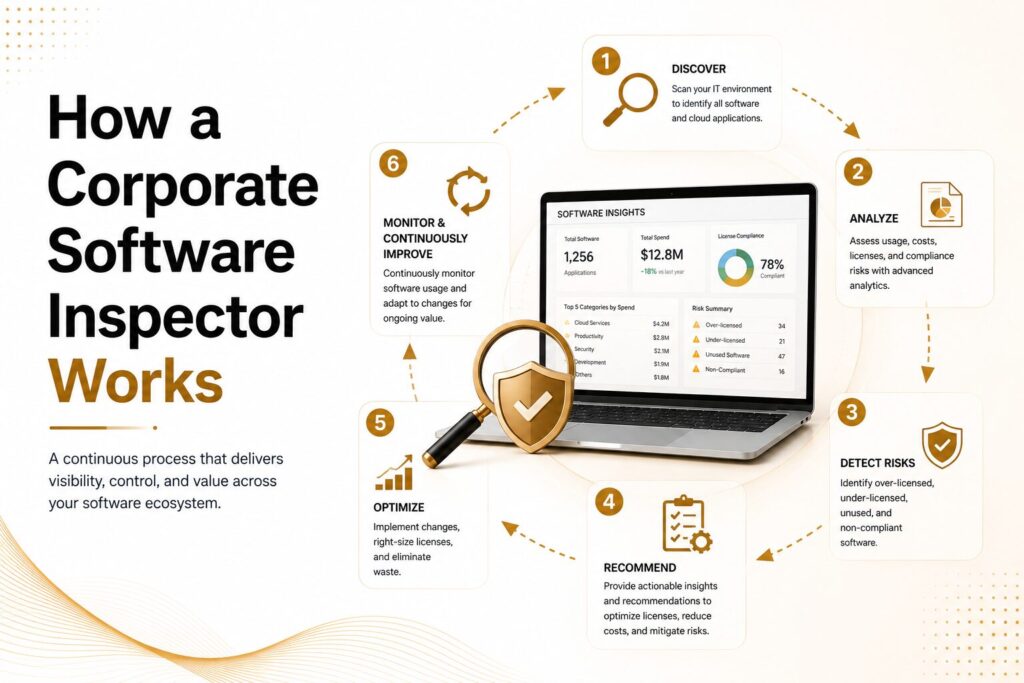
The tool follows a structured lifecycle. Each stage feeds the next, creating a continuous loop rather than a one-time assessment.
Stage 1: Authenticated Discovery
The corporate software inspector agent is deployed to endpoints and performs credentialed scans. Authenticated scanning delivers far more reliable results than passive network monitoring because it collects data directly from the device instead of guessing what may be installed. It identifies installed applications, version details, publishers, and installation paths across Windows, macOS, and supported Linux systems with a high level of accuracy.
Stage 2: Inventory Normalization
Software inventory data is often inconsistent. The same application can appear under different names, version styles, or publisher details depending on the operating system or installation method. Normalization cleans and standardizes this information so security teams can run accurate searches and reports without duplicate or misleading results.
Stage 3: Vulnerability Mapping and Risk Scoring
Once the inventory is normalized, the system compares it against updated vulnerability sources such as CVE databases, CISA KEV listings, and vendor security advisories. Each vulnerability is then prioritized using factors like severity, exploitability, asset importance, and current threat activity. This helps teams focus on the issues that present the highest risk.
Stage 4: Remediation Orchestration
For many vulnerabilities, the platform can deploy vendor-approved patches automatically through tools such as Microsoft SCCM and WSUS integrations. Organizations exploring how patch remediation automation fits into a broader AI-driven workflow will find the same principles apply across enterprise operations. Sensitive environments can also route updates through maintenance windows and change management processes to reduce operational risk while improving response speed.
Stage 5: Validation
After remediation, endpoints are scanned again to verify that patches were successfully applied. This confirmation step prevents false reporting and provides clear audit records showing when a vulnerability was fixed, on which device, and by whom. That level of verification is essential for compliance audits and incident response investigations.
Key Features to Evaluate
Not every software inspection tool delivers equal results. When evaluating the Flexera Corporate Software Inspector or any comparable platform, these capabilities determine whether the tool actually reduces risk or just generates reports.
| Feature | Why It Matters | What to Ask Vendors |
| Application library breadth | Determines how many blind spots remain | How many non-Microsoft applications are covered? How often is the database updated? |
| Authenticated scanning | The accuracy of the inventory depends on the scan depth | Can it handle offline or roaming endpoints? What happens with VPN users? |
| Risk-based prioritization | Reduces alert fatigue by focusing on what matters | Does it weigh CISA KEV entries separately? Is asset criticality factored in? |
| Automated patch creation | Reduces manual effort and deployment delay | Are patches vendor-verified? How are compatibility conflicts handled? |
| ITSM and SIEM integration | Ensures findings flow into existing workflows | Does it connect natively with ServiceNow, SCCM, Jira, or Splunk? |
| Compliance reporting | Supports audit and regulatory requirements | Which frameworks? Can evidence be exported per audit request? |
| Multi-platform coverage | Modern environments are not Windows-only | How deep is macOS and Linux support? What about containerized workloads? |
Who Benefits and Where the ROI Is Clearest
The value of a Corporate Software Inspector is not evenly distributed. Certain roles and industries see a faster, sharper return.
Security and IT leadership gain something they rarely have otherwise: a defensible, continuous picture of software risk. Instead of answering “are we patched?” with “mostly,” they can answer with specific metrics tied to specific CVEs, asset groups, and remediation timelines.
IT operations teams reduce the manual overhead of tracking vendor advisories, building patch packages, and reconciling conflicting inventory sources. That time redirects to higher-value work.
Compliance and GRC teams gain pre-built, audit-ready evidence for frameworks including NIST CSF 2.0, ISO 27001, PCI DSS, HIPAA, GDPR, and FISMA. CIS Control 2, which requires organizations to maintain a software inventory and allow only authorized software to execute, maps directly to what a software inspection program produces.
Procurement and software asset management teams gain visibility into unauthorized installations, license overage, and end-of-life products, all of which carry financial and contractual risk alongside security exposure.
Across industries, the pattern is consistent. Healthcare organizations protecting patient data, financial institutions managing breach liability, government agencies facing nation-state targeting, manufacturers with OT-adjacent software exposure, and educational institutions managing sprawling device fleets all share the same underlying problem: too much software, too little visibility, too much time between detection and remediation.
A well-deployed software inspection program typically delivers a 50% reduction in unpatched high-severity vulnerabilities within the first 90 days. Some organizations reach 70 to 80% in that window. The downstream effect on audit preparation time and security incident frequency is measurable within two quarters.
For organizations evaluating this type of investment, an enterprise software risk posture assessment can help you identify where your gaps are concentrated before committing to a specific platform, making the deployment significantly more effective.
Flexera Corporate Software Inspector vs. Comparable Platforms
The Flexera Corporate Software Inspector remains a benchmark in this category, particularly for large enterprises with established software asset management programs. But it is not the only option, and for some organizations, a different tool will be a better fit.
| Platform | Core Strength | Practical Limitation | Best Suited For |
| Flexera CSI | Broadest third-party app library, patch automation, and SAM integration | High setup complexity, enterprise pricing | Large enterprises with existing SAM programs |
| Qualys VMDR | Strong cloud-native vulnerability coverage, broad CVE database | Patch deployment requires additional tooling | Security-first organizations running a hybrid cloud |
| Tenable.io | Excellent CVE coverage and dashboards, strong compliance mapping | Does not handle patch deployment natively | Vulnerability assessment-focused security teams |
| ManageEngine Patch Manager Plus | Accessible pricing, faster deployment | Narrower application library than Flexera | Mid-market organizations and SMBs |
| WSUS and SCCM alone | No additional cost, deep Windows integration | Limited entirely to the Microsoft ecosystem | Homogeneous Windows environments with minimal third-party apps |
The right choice depends on three factors: the size and diversity of your endpoint environment, your existing tooling stack, and whether your primary goal is software visibility, patch automation, or integration with a software asset management program.
For organizations weighing these options, our guide to enterprise vulnerability management tools provides a side-by-side breakdown with real deployment considerations. And if you are earlier in the process, our software asset management guide explains how to build the inventory foundation that makes any inspection tool more effective.
How to Deploy a Corporate Software Inspector the Right Way
Deployment failures in this category almost always trace back to the same mistakes: starting too broadly, skipping normalization, and failing to define ownership before the first scan runs. A phased, deliberate approach avoids all three.
Before You Deploy
Map your endpoint inventory, even roughly, before touching the tool. Define what “authorized software” means in your organization. Create a policy that distinguishes approved applications, tolerated applications, prohibited applications, and exceptions requiring review. Without that policy, scan results will generate debate rather than action.
Identify where the tool will integrate. SCCM, WSUS, your CMDB, your ITSM platform, and your SIEM are the common integration points. Confirm access and test connectivity before the rollout begins.
Assign remediation ownership. Security teams finding vulnerabilities they cannot fix, because nobody owns the application, is one of the most common reasons software inspection programs stall. This challenge mirrors what happens across all enterprise technology programs — as explored in our analysis of enterprise AI governance and ownership structures, the absence of clear accountability is what causes most initiatives to stall regardless of how capable the underlying tool is.
Phased Deployment
Focus on the most critical first endpoints: Internet-facing systems, privileged user workstations, servers hosting critical business applications, and any endpoint subject to compliance frameworks. This gives early successes and confidence in the tool’s accuracy prior to scale.
Run a pilot covering roughly 10 to 15% of your environment. Validate that scan results align with known inventory. Investigate discrepancies before expanding. Patch compatibility issues caught in a pilot affect dozens of machines; caught in production, they affect thousands.
Expand in waves. Prioritize by risk tier, not by geography or business unit, unless regulatory boundaries require otherwise.
After Deployment
Establish remediation SLAs and enforce them. Critical CVEs, particularly those on CISA’s KEV list, should be addressed within 24 to 72 hours. High-severity vulnerabilities warrant a seven-day window. Medium-severity issues should be resolved within 30 days. Without defined timelines, findings accumulate, and the queue becomes unmanageable.
Schedule validation scans after every patch cycle. Never assume deployment equals remediation. Rescanning confirms that patches took effect, that nothing was inadvertently reverted, and that new vulnerabilities have not appeared in the interval.
Build executive reporting that translates technical findings into business language. “We reduced high-severity unpatched vulnerabilities on finance endpoints by 60% this quarter” is actionable information for leadership. Raw CVE counts are not.
Review your exception backlog quarterly. Exceptions accumulate silently. An exception granted in one quarter for a business reason that no longer exists in the next quarter is an unmanaged risk.
Common Deployment Mistakes and How to Avoid Them
Treating software inventory as an annual project. Environments change daily. Applications are installed, updated, and removed continuously. Inventory has to be continuous to be useful.
Patching the OS and considering the job done. The most common and most costly misconception in enterprise patch management. Third-party applications represent the majority of exploitable CVEs in most environments.
Skipping normalization. Noisy, inconsistent inventory data makes prioritization unreliable. Invest time in normalization before acting on results.
Running scans without defined ownership. Findings without owners sit unresolved. Define who remediates what before the first scan runs.
Skipping validation scans. Assuming a patch deployed successfully is not the same as confirming it. Always rescan.
Reporting in technical language to non-technical leadership. Security programs that cannot demonstrate business value in plain terms struggle to maintain budget and organizational support.
The Future of Software Inspection
Three developments will shape the next generation of corporate software inspection.
First, AI-assisted vulnerability prioritization is reshaping how security teams triage findings. Machine learning models trained on exploit development patterns can predict which newly disclosed CVEs are likely to be weaponized before exploit code appears in the wild. This shifts remediation timing from reactive to genuinely predictive.
Second, expanded coverage. Traditional software inspection focused on installed applications on managed endpoints. Future platforms will extend visibility to cloud-native workloads, containerized environments, SaaS application inventories, and software dependencies tracked through software bill of materials (SBOM) records. SBOM is becoming a compliance requirement in regulated sectors, particularly government contracting, and software inspection tools will need to integrate with it.
Third, tighter alignment with zero-trust architecture. Continuous software posture verification, confirming that a device’s installed software meets policy at the moment of access, becomes part of the access decision rather than a separate audit function. This makes software inspection a live control rather than a periodic assessment.
The Bottom Line
A strong Corporate Software Inspector program gives enterprise IT something it seldom achieves by accident: reliable, continuous visibility into what software exists, where the real risk sits, and what requires attention first. The technology works. The gap it closes is real and exploited regularly. What separates organizations that benefit from those that do not is disciplined deployment, defined ownership, and consistent follow-through on validation.
Software inspection is not housekeeping. It is one of the highest-leverage security investments an enterprise can make, precisely because the vulnerabilities it closes are the ones threat actors are already actively using. According to CISA’s guidance on patch management best practices, timely remediation of known exploited vulnerabilities remains one of the most effective risk reduction actions any organization can take.
Start with your highest-risk endpoints. Define your authorization policy. Build remediation ownership into your operating model. And rescan after every patch cycle without exception.

Senior SEO Content Marketing Manager at Trendusai.com
Rashida Hanif is a Senior SEO Content Marketing Manager at Trendusai.com, specializing in data-driven content strategy and SEO. She helps brands improve online visibility through keyword research, content planning, and AI-powered marketing insights.